
 Models
 Materials
 HDRIs
HDRIs
 Scenes
 Brushes
 Node Groups
 Printables
 Creators
 Creations
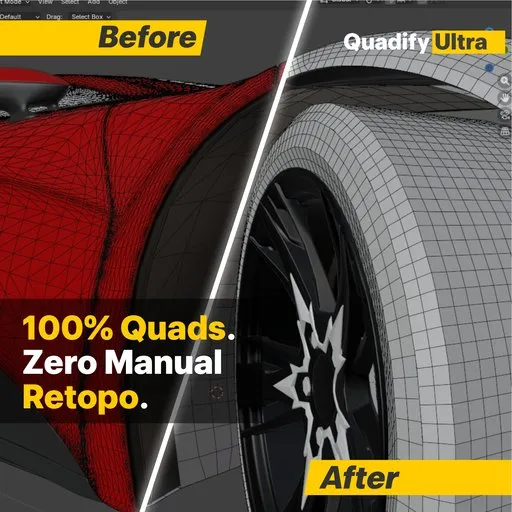
Quadify Ultra
 add-on
Professional AI-powered retopology — one click to clean quads
Quadify — Clean quad topology from any mesh. Scans, CAD imports, AI geometry, photogrammetry. No subscription.
Quadify converts triangulated meshes into clean, controllable quad topology — ready for subdivision, rigging, LOD generation, or game engine export. It works on the meshes you actually deal with: photogrammetry scans, CAD imports, AI-generated geometry, marketplace assets, and mixed tri/quad files. Quadify converts triangulated meshes into clean, controllable quad topology — ready for subdivision, rigging, LOD generation, or game engine export. It works on the meshes you actually deal with: photogrammetry scans, CAD imports, AI-generated geometry, marketplace assets, and mixed tri/quad files.
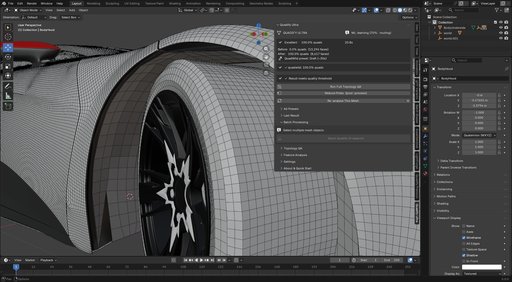
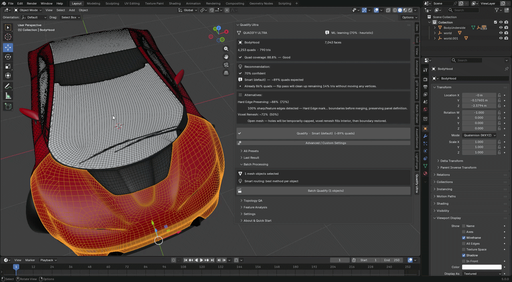
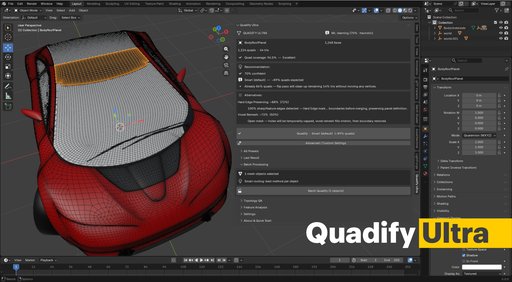
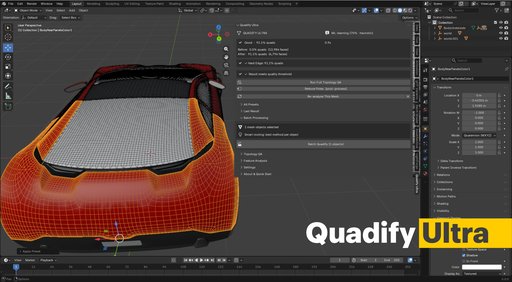
No black-box remeshing. No subscription. No guessing. You decide which regions are protected, which are processed aggressively, and exactly how the pipeline runs. Quadify gives you repeatable, predictable results across every asset in your library.
Who uses Quadify: • Game artists cleaning photogrammetry and scan data for Unreal or Unity • Archviz artists processing CAD imports and converting them for rendering • Environment artists optimising large prop and kit-bash libraries • Technical artists and studios running batch pipelines across hundreds of assets • Freelancers delivering clean, export-ready geometry on deadline
If you've looked at Quad Remesher — it's a great tool for full-mesh auto-retopology. Quadify solves a different problem. Quad Remesher replaces your entire mesh with a new topology. Quadify works with your existing mesh, preserving UV seams, material boundaries, sharp edges, and protected regions. It's designed for production pipelines where you cannot afford to lose what's already good. And unlike Quad Remesher, Quadify is a one-time purchase with no recurring cost.
How Quadify fits your workflow
Quadify runs immediately after mesh import — on scans, CAD files, AI-generated geometry, or any triangulated source. Use it to normalize problem topology, reduce cleanup time, and produce geometry that's ready for the next stage of your pipeline, whether that's subdivision, rigging, LOD generation, or engine export.
It doesn't replace manual retopology for hero assets. It eliminates the hours of cleanup you'd otherwise do before you even start.
Common situations: • Scan and photogrammetry data that needs quad-dominant topology before subdivision or rigging • CAD imports with dense ngon surfaces that can't be edited or subdivided cleanly • AI-generated meshes with uniform tri-soup topology • Mixed tri/quad marketplace assets that need to be production-ready • Large prop libraries where every asset needs consistent polygon density
Why Quadify exists
Every other approach forces a choice: either hand it to a black-box remesher and lose control, or spend hours cleaning manually. Quadify does neither.
The conversion engine is deterministic and artist-controlled. You configure the passes, set the thresholds, define which regions are protected, and get the same result every time. No artistic decisions are made for you — only the mechanical work of converting, cleaning, and optimising.
Core features — all editions
• Multi-pass tri-to-quad conversion that recovers more quads than a single pass • Respects UV seams, material boundaries, and sharp edges throughout
• Mesh health check with one-click repair for non-manifold edges, zero-area faces, flipped normals, and loose geometry • Live quad overlay — real-time viewport tint showing green quads and red tris as you work • Before/after snapshot — saves a shape key before any operation so you can compare original and result at any time • Poly reduction with safe two-pass mode for heavy meshes
Ultra uses Blender's built-in conversion tools — the intelligence is in knowing which one to use, when, and why.
Every mesh type needs a different approach. A car panel needs something different from a photogrammetry scan. A CAD import needs something different from an organic mesh. Picking the wrong algorithm wastes time and produces a bad topology. Ultra makes that decision automatically.
How it works:
Analyses 18 geometric features of your mesh — boundary ratio, surface curvature, edge distribution, n-gon density, and more
Routes to the right algorithm from 5 options — Smart, Hard Edge Preserving, Dissolve + Requadify, QuadriFlow + Transfer, or Voxel Remesh + Transfer
Shows a confidence score before you commit — so you can override if you disagree
Runs the operation and shows before/after face counts, quad coverage, and elapsed time
The routing engine learns over time. After 30+ operations, it starts making recommendations based on your specific mesh types rather than general rules. The Community ML Model lets you pull aggregated routing data from opted-in users worldwide — the more people use it, the smarter the routing gets for everyone.
Real results on production meshes:
Mesh Input Result Time
Car hood 7,043 faces 88.8% quads 0.9s
Roof panel 12,984 faces 91.1% quads 0.9s
Roof panel 1,268 faces 96.5% quads —
Batch 3 panels mixed 93.2% avg —
Organic mesh 39,190 faces 100% quads 7.7s
What Ultra is not: It is not a novel remeshing algorithm. It does not replace Blender's built-in tools — it decides which one to use and runs it for you. If you need a tool that generates an entirely new topology from scratch, Quad Remesher is the right choice. If you need a tool that cleans up meshes you already have without losing UVs, sharp edges, or material boundaries — and makes the routing decision automatically — that is what Ultra does.
Everything in Pro, plus: ML-powered algorithm routing, confidence scoring, Community ML Model, Voxel Remesh + Transfer, per-object ML routing in batch, and anonymous opt-in telemetry.
A note on development
Quadify's mesh operations are deterministic and fully artist-controlled. AI-assisted tools were used during development to support code quality and testing. Quadify's conversion, cleanup, and optimisation operations themselves are not AI-driven — every operation is rule-based, auditable, and produces the same result given the same input.
Clean quads. Clear intent. No guesswork.
Credits
Car mesh used in product images: © 2017 Khronos Group (3D Commerce Asset). Licensed under CC BY 4.0 International — https://creativecommons.org/licenses/by/4.0/


