Credit Manager Pro
Credit Manager Pro v2.0 for Blender 5.x organizes, documents, and exports asset credits and licenses. Ideal for large scenes and professional workflows. Keep full control over asset origin, licensing, and usage at all times.
Credit Manager Pro - Documentation
Overview
Credit Manager Pro is a professional Blender addon designed to help artists, studios, and freelancers track and manage asset credits and licenses. Whether you're working with marketplace assets, client projects, or building a portfolio, Credit Manager Pro keeps all your attribution and licensing information organized in one place.
Installation
Requirements
- Blender 5.0 or higher
- No additional dependencies required
Installation Steps
- Download the credit_manager_v2.zip file
- Open Blender 5.x
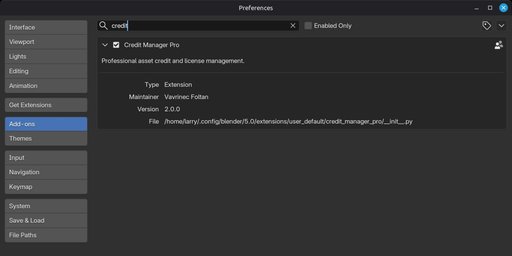
- Go to Edit → Preferences → Add-ons
- Click the Install button (top right)
- Navigate to and select the downloaded ZIP file
- Enable the addon by checking the checkbox next to Credit Manager Pro
- The addon is now installed and ready to use
Accessing the Addon
- In the 3D Viewport, press N to open the sidebar
- Look for the Credits tab
- Click on it to access Credit Manager Pro
Interface Overview
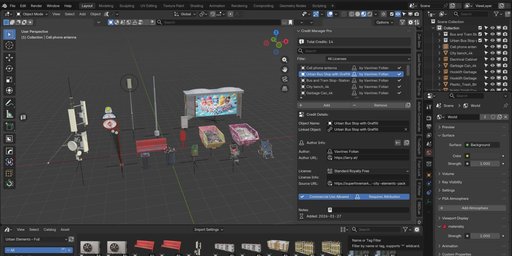
Main Panel: Credit Manager Pro
The main panel contains all the core functionality.
Header Section
- Total Credits counter – Shows how many credits are currently tracked
- Search bar – Quickly find credits by typing object name, author, or license
- Filter dropdown – Filter credits by license type
Credit List
- Displays all your credit entries
- Shows object name, author, and license type with icons
- Click any entry to select and edit it
Action Buttons
- Add – Create a new credit entry
- Remove – Delete the selected credit
- Duplicate (⎘) – Copy the selected credit with all its data
Credit Details Section
When a credit is selected, this section shows all editable fields:
- Object Name
- Linked Object
- Author Name
- Author URL
- License Type
- License Info
- Source URL
- Commercial Use checkbox
- Requires Attribution checkbox
- Notes
- Date Added (automatic)
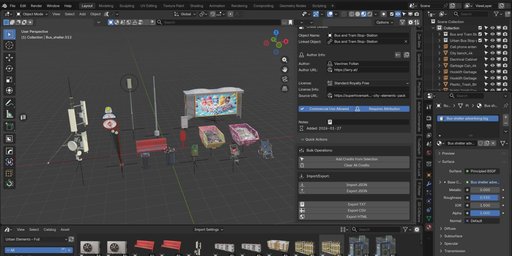
Quick Actions Panel
Located below the main panel, contains bulk operations and export functions.
Bulk Operations
- Add Credits from Selection
- Clear All Credits
Import / Export
- Import JSON
- Export JSON
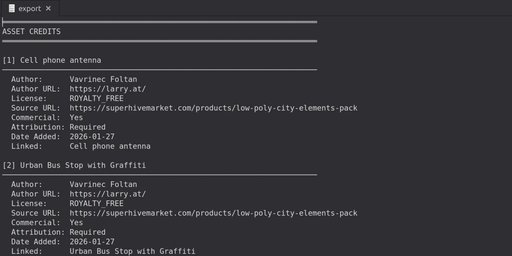
- Export TXT
- Export CSV
- Export HTML
Core Features
Adding Credits
Single Credit Entry
Method 1: Manual Add
- Select an object in your scene (optional)
- Click the Add button
- The credit is created with the object's name (if selected)
- Fill in the details in the Credit Details section
Method 2: From Active Object
- Select the object you want to credit in the 3D viewport
- Click Add
- Object name and link are automatically filled
Bulk Credit Creation
Add Credits from Selection – Perfect for asset packs.
- Select multiple objects in your scene
- Open the Credit Manager Pro panel
- Scroll to Quick Actions
- Click Add Credits from Selection
- Credits are created for all selected objects instantly
- Duplicate credits are automatically skipped
Example Use Case
- Import 20 furniture models from the same creator
- Select all 20 objects
- Click Add Credits from Selection
- 20 credit entries are created in seconds
Editing Credits
Basic Information
Object Name
- The name of your asset
- Can be edited independently of the Blender object name
Linked Object
- Dropdown to link a Blender object
- Helps locate assets in the scene
- Link persists through renaming but breaks if object is deleted
Author Name
- Name of the asset creator
- Required for proper attribution
Author URL
- Website or profile link of the creator
- Clickable in HTML exports
Source URL
- Where the asset was obtained
- Link to the product page
License Management
License Type – Choose from 11+ options
- Standard Royalty Free
- CC0 (Public Domain)
- CC-BY 4.0
- CC-BY-SA 4.0
- CC-BY-NC 4.0
- Editorial
- GPL
- MIT
- Apache 2.0
- BSD
- Custom License
License Info
- Additional license details
- Example: Attribution required in end credits only
Commercial Use Allowed
- Indicates commercial permission
- Useful for filtering paid projects
Requires Attribution
- Marks assets requiring attribution
- Ensures license compliance
Notes
- Free-form notes
-
Examples:
-
Purchased June 2024 – unlimited projects
- Modified textures for this project
- Contact artist for extended license
Date Added
- Automatically recorded
- Useful for tracking asset history
Copy & Bulk Operations
Copy from Previous
- Copies author and license data from the previous credit
- Ideal for multiple assets from the same creator
Bulk Apply Author Info
- Applies author and license data to a selected range
- Saves large amounts of repetitive work
Search & Filter
Search
- Searches object names, authors, and licenses
- Case-insensitive
- Instant filtering
License Filter
- Filter credits by license type
- Useful for compliance checks
Import & Export
JSON
- Backup
- Share between projects
- Team collaboration
CSV
- Spreadsheet compatible
- Asset and license tracking
TXT
- Plain text documentation
- README and archives
HTML
- Professional styled credit pages
- Clickable links
- License badges
- Ideal for clients and portfolios
Credits
Original Author: Vavrinec Foltan
Version 2.0 Update: Enhanced for Blender 5.x
License: GNU GPL v3