Object Bender
Bend anything! Object Bender is the ultimate tool for deforming meshes along curves in Blender. Get perfect, smooth bends with an intuitive workflow.
Object Bender: Bend Anything with Precision and Ease
Tired of the complex and time-consuming process of bending objects along curves? Object Bender is here to revolutionize your workflow! This powerful and
intuitive addon for Blender allows you to deform any mesh along a curve with just a few clicks, giving you perfect, smooth results every time.
How It Works
Getting the perfect bend is as simple as 1-2-3:
-
Select Your Curve: Choose any poly curve, spline, or even a mesh curve to define the path.
-
Select Your Object: Pick the object you want to deform. For predictable results, ensure it is aligned with an axis and apply any existing modifiers first.
-
Click Bend: Press the "Bend" button, and the addon takes care of the rest!
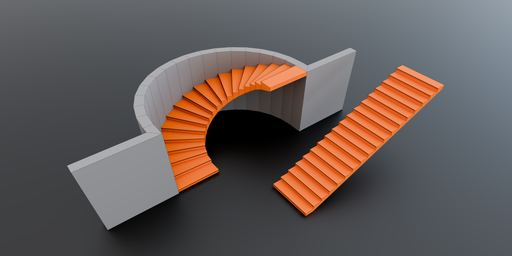
No need to manually subdivide your object to prepare it for bending—Object Bender handles the necessary geometry adjustments for a smooth deformation.
Key Features
* Automatic Scaling & Length Matching
use the built-in "Curve Length" button to display the exact length of your curve. This allows you to model your object to the perfect size before bending.
-
Full Alignment Control
Fine-tune your object's placement with a comprehensive set of alignment tools.
-
Align to the Front, Middle, or Back of the curve.
-
Snap to the Top, Center, or Bottom.
-
-
Reverse Direction
Need the object to face the other way? The "Reverse" button instantly flips the object's orientation 180 degrees along the curve, saving you from having
to manually rotate and re-align it.
-
Interactive Position Adjustment
Easily slide your object along the curve to get the exact position you need with the interactive adjustment operator.
-
Clean Workflow
Add, adjust, and tweak the bend effect at any point in your process. When you're happy with the result, you can apply the deformation permanently or
remove the effect to revert to your original object.