BlenderKit logo
  • Download BlenderKit
  • Subscribe
  • Mission
  • Users
    • Info for users
      • FAQ
      • Get Blender add-ons
      • BlenderKit in Godot
      • Add-on troubleshooting
      • Licenses
      • Licenses FAQ
    • Terms & conditions
      • Terms and Conditions
      • Privacy Policy
      • Refund Policy
    • Service status
    • Cookies
      • Cookie Policy
      • Cookie settings
  • Creators
    • Overview
    • FAQ
    • Terms and Conditions for creators
    • General Uploading info
    • Upload Models
    • Upload Materials
    • Upload Brushes
    • Upload Add-ons
    • Upload Scenes
    • Upload HDRs
    • Upload Printables
    • Guidelines for add-on creators
    • Blender Tutorials
    • Validation Statuses
    • Fair Share Redistributions
    • Affiliate program
    • Most common upload issues
  • News
  • About
    • Our team
    • Contact
    • Press Kit
    • Blender 3D Training
    • Job positions
  • BKON 2026
  • Models
  • Materials
  • HDRI
  • Scenes
  • Brushes
  • PrintablesNEW
  • Add-onsNEW
  • Log In
  • Register

BK BD 25

Blender 3D Modeling Blender Add-Ons

Free Plan

Get 62,110 free assets

Full Plan

Access the full library & enjoy 131,581 assets

Blender add-ons 15%

Find free & paid Blender add-ons

Become creator

Share & sell your assets

< All assets

Add-ons icon Add-ons

  • Models icon Models
    • Architecture
      • Building
        • Commercial Historic Private Sci-fi
        • other...
        Door Exterior element
        • Bench Facade element Fence Fountain Playground Swimming pool Urban Environment
        • other...
        Floor Covering Molding / Carving Scenes Stairs Structure Wall Panel
        • 3D Panel Stone Panel Upholstery Panel Wood Panel
        • other...
        Window
      • other...
      Character
      • Anatomy
        • Full Body Head Internal organ Limbs Skeleton
        • other...
        Animal
        • Bird Dinosaur Fish Insect Mammal Reptile
        • other...
        Clothing
        • Accessories Footwear Headwear Man Clothing Woman Clothing
        • other...
        Humanoids
        • Child Fantasy Hero/ Heroines Medical Men Military Police Sci-Fi Sports Women
        • other...
        Monster / Creature Robot
      • other...
      Decoration
      • Bag / Suitcase Blanket Book Carpets Clock / Watch Curtain Decoration Set Fabrics Fireplace Food / Drinks
        • Beverage Food Fruit / Vegetable Kitchenware Sweets / Dessert Tableware set
        • other...
        Holiday Decoration Mirror Money Picture Pillow Sculpture Textile Vase Miscellaneous
      • other...
      Effects / Simulations
      • Modifier Motion design Simulations Technical
      • other...
      Industrial
      • Container Equipment Machinery Parts Sign Tools
        • Handtools Powertools
        • other...
      • other...
      Interior
      • Armchair Bathroom furniture
        • Accessories Bathhub Faucet Furniture Set Laundry Shower Toilet / Bidet Towel rail Wash Basin
        • other...
        Bed Cabinets
        • Bookcase Commode Shelving TV Cabinets
        • other...
        Chair
        • Bar Chair Regular Chair
        • other...
        Console Dressing Table Kids furniture
        • Bed Chair Furniture Set Miscellaneous Table Toy Wardrobe
        • other...
        Kitchen Furniture
        • Faucet Kitchen Appliance Kitchen Set Sink Storage
        • other...
        Lights
        • Ceiling Light Floor Lamp IES Light Industrial Light Outdoor Light Table Lamp Wall Light
        • other...
        Office Furniture
        • Chair Desk Stationery Storage Table
        • other...
        Outdoor Furniture Pouf Restaurant / Bar Seating Set
        • Chair-table Set Sofa-table Set
        • other...
        Shopping / Retail Sideboard / Drawers Chest Sofa Table Wardrobe
      • other...
      Military
      • Aircraft Vehicles Watercraft Weapon / Armor
        • Historic Modern Sci-Fi
        • other...
      • other...
      Nature
      • Atmosphere
        • Cloud Fog Smoke / Fire Wind Setup
        • other...
        Grass Landscape
        • Environment Elements Terrain
        • other...
        Plant
        • Bouquet Fitowall Indoor Outdoor
        • other...
        Tree
      • other...
      Science
      • Lab Equipment Medical Equipment Microbiology Miscellaneous Pharmacy
      • other...
      Space
      • Miscellaneous Planet Satellite Spacecraft Station
      • other...
      Sport / Hobby
      • Fishing Gym Hobby Accessories Miscellaneous Music
        • Accessories Instruments Stage Studio
        • other...
        Sport
      • other...
      Technology
      • Audio Devices Computer
        • Components / Hardware Desktop Game Console Keyboard Laptop Monitor Mouse Peripheral
        • other...
        Device
        • Cellular Phone Corded Phone Smartphone Smart Watch Tablet
        • other...
        Home Appliance Miscellaneous Photography Robotics Video devices
      • other...
      Transport
      • Aircraft
        • Accessories / Part Air Baloon Airplane Drone Glider Helicopter Historic Plane Private Jet Seaplane
        • other...
        Bicycle Car
        • Buggy Concept Historical Luxury / Supercar Modern Racing Sci-Fi
        • other...
        Emergency
        • Ambulance Fire trucks Police
        • other...
        Heavy Vehicle
        • Industrial Trailer Truck Van
        • other...
        Motocycle
        • Historical Race Standard
        • other...
        Public Transport
        • Bus Taxi
        • other...
        Railed vehicle
        • Cargo Passenger
        • other...
        Small Electric Vehicles Vehicle Parts Watercraft
        • Accessories / Part Boat Hovercraft Ship Submarine Yacht
        • other...
      • other...
    • other...
  • Materials icon Materials
    • Animal Asphalt Bricks Ceramic Concrete Dirt Fabric
      • Blackout Chenille Dimout Embroidery Flat weave Jacquard Print Sheer Suede Texture Velvet Vinyl / Imitation leather
      • other...
      Floor Food Fx Glass Grass Ground Human Ice Leather Liquid Marble Metal Organic Ornaments Paper Paving Plaster Plastic Rock Roofing Rubber Rust Sand Soil Stone Tech Tiles Wood
    • other...
  • HDRIs icon HDRIs
    • Indoor
      • Abstract Futuristic Environments Holiday Industrial Interiors Nighttime Environments Public Residential Rural Sports Studio
      • other...
      Outdoor
      • Abstract Architectural Cityscapes Futuristic Environments Holiday Landscapes Nature Nighttime Environments Sports Urban Water Environments
      • other...
    • other...
  • Scenes icon Scenes
    • Abstract Cartoon Exterior
      • Architectural Nature Post-apocalyptic Private Public Rural Urban
      • other...
      Gaming Industrial Interior
      • Creative studios
        • Photography Studios TV Studios YouTube/Podcast Studios
        • other...
        Interior Isometric Private Public
      • other...
      Product visualization
      • Cloth viz Mockup Studio
      • other...
      Science Templates
      • Background Brush templates Magazine cover Typography Validation scenes
      • other...
      Thematic Scenes
      • Fantasy Historical Holiday Sci-fi Space Underwater
      • other...
    • other...
  • Brushes icon Brushes
    • Anatomy
      • Animal / creature
        • Claws Face / head Feather Fins Fur Limbs Organs Scales Scars & wounds Skeleton Skin Spikes Tails & horns
        • other...
        Human
        • Body Face Hair & nails Muscles Organs Scars & wounds Skeleton Skin
        • other...
      • other...
      Art
      • Pattern Sculpture
      • other...
      Clothing
      • Accessories Fabric Stitches
      • other...
      Damage
      • Concrete Crack Cut Dirt Glass Metal Plaster Rust Wood
      • other...
      Geometric Industrial
      • Hard surface Sci-fi
      • other...
      Misc Nature
      • Crater Fire Ice Landscape Organic Plant Rock Soil Stone Wood
      • other...
    • other...
  • Node Groups icon Node Groups
    • Compositing Nodes Geometry Nodes
      • Curves
        • Curve Deformers Curve Optimizers Curve Shapes
        • other...
        Distribution
        • Arrays Distribution Transform Surface Distribution Volumetric Distribution
        • other...
        Generators
        • Animations Curve Generators Measurements Mesh Generators Voxel Generators
        • other...
        Material
        • Colors
        Math
        • Functions
        Selection
        • other...
        Simulation
        • Diffusions Particle Physics
        • other...
        Tools
        • Edit / Object mode
        • other...
        Topology
        • Mesh Deformers Mesh Primitives Remeshers Tessellate Mesh
        • other...
        Utilities
        • Rotation Switches Text / String Tools UV Vector Fields
        • other...
      • other...
      Shading Nodes
      • Effects Procedural Textures
      • other...
  • Printables icon Printables
    • Containers Fashion Games Holders Instruments Mechanics Misc Organics
    • other...
  • Add-ons icon Add-ons
    • 3D View Add Mesh Animation Development General Import - Export Material Mesh Modeling Node Object Paint Render Rigging Scene System Tools User Interface UV
  • Creators icon Creators
  • Creations icon Creations

What is BlenderKit?

BlenderKit is a community‑driven 3D asset library integrated into Blender 3D.

Founded in the spirit of open‑source, BlenderKit is available for free.

With a Full Plan subscription, users support BlenderKit creators and open‑source development, while enjoying access to the full database.

Find out more
YouTube Facebook Instagram GitHub TikTok BlueSky
  • Trending  
  • Most bookmarked  
  • Highest asset score  
  • Highest complexity  
  • Highest quality  
  • Asset count  
  • Asset score sum
  • Newest
  • Most relevant
  • All
  • Free
  • Full
  • Paid
  • All assets
  • My bookmarked assets
  • All
  • 0 - 999
  • 1,000 - 9,999
  • 10,000 - 99,999
  • 100,000 - 999,999
  • 1,000,000 and more
  • All
  • Less than 256
  • 256
  • 512
  • 1K
  • 2K
  • 4K
  • 8K
  • 16K and more
  • All
  • Sculpt
  • Texture paint
  • All
  • Procedural
  • Texture based
  • All
  • Realistic
  • Non photorealistic
  • Other
  • All
  • Yes
  • No
  • All
  • Geometry nodes
  • All
  • Yes
  • No
  • All
  • Yes
  • No
  • All
  • No Sexualized Content
  • Sexualized Content
  • All
  • Yes
  • No
  • All
  • Windows
  • MacOS
  • Linux
  Bookmarks
The asset was added to your bookmarks.
Now you can filter it in BlenderKit add-on.
  Bookmarks
The asset was removed from your bookmarks

Survey Terrain Tools – Geodetic & Construction Workflow

add-on add-on

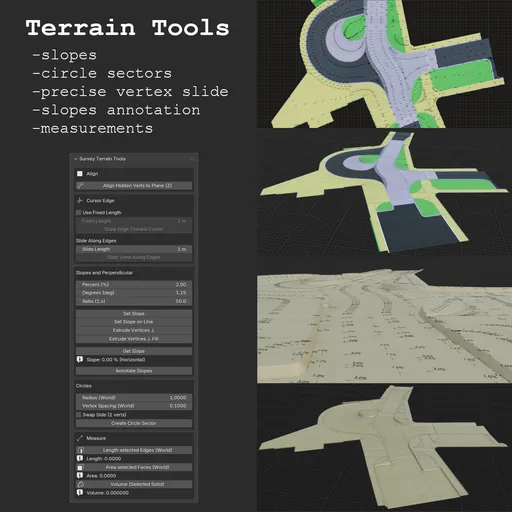
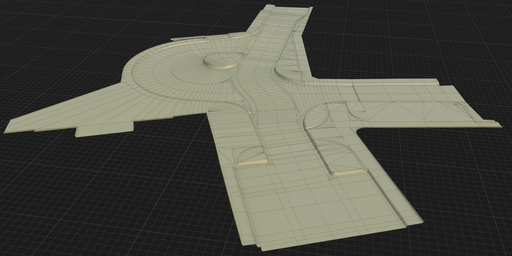
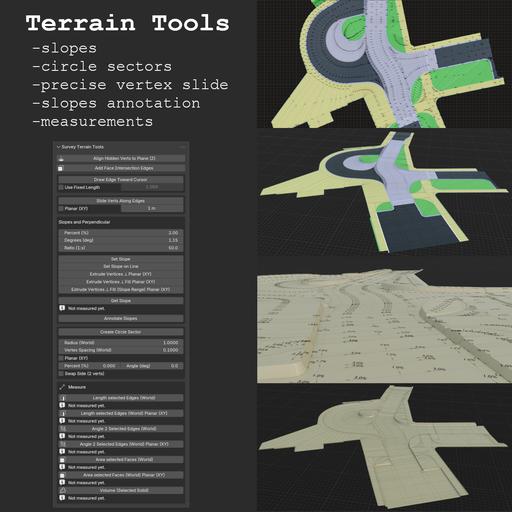
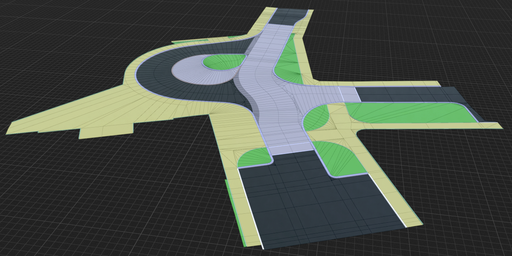
Survey Terrain Tools is a terrain-focused Blender add-on designed for fast, precise, and practical mesh workflows used in survey, civil-engineering, and CAD-style modeling.
$19 $16.15
Share on Twitter Share on Facebook Share link
Image 1
Image 2
Image 3
Image 4
Image 5
Image 6
Survey Terrain Tools for Blender

Terrain-focused modeling and measurement toolkit for fast survey/CAD-style mesh workflows.

Designed for production use: deterministic tools, world-space measurements, and predictable geometry creation.

Why This Add-on
  • Hidden-vertex alignment with Align Hidden Verts to Plane (Z)
  • Cursor-driven edge creation and controlled vertex sliding
  • Slope workflows for single edits, line batches, and perpendicular extrusions
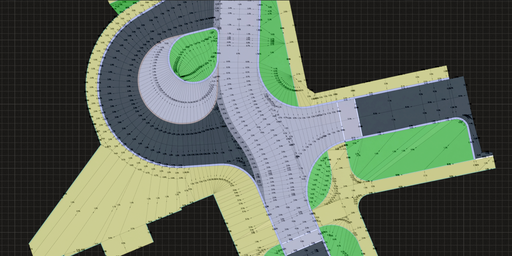
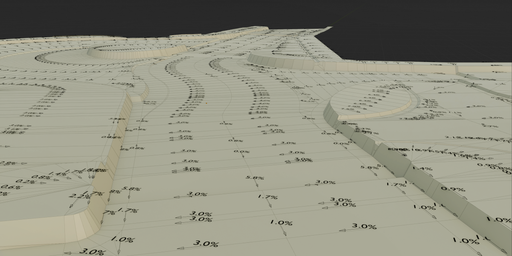
  • Slope annotation labels and drop-direction arrows (Annotate Slopes)
  • Practical circle-sector construction (2-point and true 3-point)
  • World-space measurement tools (length, area, volume) and face-plane intersection edges in one panel
  • Minimal setup, no external Python dependencies
Feature Overview Align
  • Align Hidden Verts to Plane (Z)
  • 2 verts: computes Z from a vertical-plane rule in XY
  • 3 verts: projects hidden vertices along Z to the infinite plane defined by the 3 selected verts
  • Workflow: hide vertices you want to align, keep reference vertices visible and selected, then run the operator
  • Useful when pulling geometry in XY first (for example from ortho/reference edges) and resolving final Z/slope afterward
Faces
  • Add Face Intersection Edges
  • Edit Mode: select two or more faces (adjacency not required)
  • For each pair of faces, intersects their supporting planes and adds one edge along the overlap clipped to both faces; faces are not deleted
  • Works best on convex faces; concave ngons may miss segments or clip incorrectly
Cursor Edge / Slide
  • Draw Edge Toward Cursor
  • Modal viewport tool with preview line
  • Works in Edit Mode from active/selected vertex
  • Uses panel values: Use Fixed Length + Fixed Length
  • Enables line creation at arbitrary mouse-defined angle with precise length control
  • Creates one new vertex and one connecting edge on confirm
  • Slide Verts Along Edges
  • Slides selected vertices along exactly one connected visible edge
  • Uses dedicated panel values: Slide Length and optional Planar (XY) (world XY projection / plan view)
  • Default: exact slide distance along the 3D edge (world-space length)
  • With Planar (XY): Slide Length is the length of the world XY projection of the move (still along the 3D edge); purely vertical-in-XY edges are skipped
  • Ignores hidden edges when checking connectivity
  • Vertices that do not match the one-edge rule are skipped
Slopes & Perpendicular
  • Set Slope
  • 2 selected vertices, applies Z offset on active vert from current slope inputs
  • Set Slope on Line
  • Batch tool: supports isolated selected edges or one connected open line
  • Extrude Vertices ⊥ Planar (mesh XY)
  • Extrudes selected vertices along the angle bisector (miter) of connected edges
  • Builds offset line from the selected line/loop with adjustable slope on created edges
  • Planar (mesh XY): edge directions are projected to local XY (plan view in mesh space); slope “run” is distance in that plane (not world-ground unless the object is aligned)
  • Angle Correct Length compensates corner angles so offset width stays more uniform at bends
  • Extrude Vertices ⊥ Fill Planar (mesh XY)
  • Same as above, plus side-face fill between neighboring extrusions
  • Supports one open non-branching line and one closed non-branching loop
  • Extrude Vertices ⊥ Fill (Slope Range) Planar (mesh XY)
  • Like Extrude Vertices ⊥ Fill, but slope varies linearly from Slope from (%) to Slope to (%) along the line
  • Requires one open non-branching line (exactly 2 endpoints); no loop
  • Active endpoint gets Slope to; opposite endpoint gets Slope from
  • Dialog: Slope from (%), Slope to (%), Swap From/To (swap from/to in computation)
  • Get Slope
  • Reads slope from 2 selected vertices and writes result below the button
  • Annotate Slopes
  • Creates slope text + drop-direction arrows at edge midpoints (in a new collection)
  • Processes all mesh edges (with optional length filter in dialog)
  • Label format selectable in operator dialog: Percent (%) or Ratio (1:x)
Circles
  • Create Circle Sector
  • 2 verts: arc between selected endpoints using Radius (World)
  • When distance > 2R, radius is remapped internally for computation only, major arc is used, and side is flipped internally for stable behavior
  • Default is 3D (tilted arc plane). Enable Planar (XY) to force plan-view arc generation in world XY
  • Tilt can be entered as Percent (%) or Angle (deg) (synchronized); ignored in 3-vertex mode
  • 3 verts: true 3D circle from all selected points; generated arc passes through all three selected vertices
  • Vertex Spacing (World) controls tessellation density
Measure (World Space)
  • Length selected Edges (World)
  • Length selected Edges (World) Planar (XY) — sum of edge lengths in world XY (plan view; vertical-in-XY edges contribute 0)
  • Angle 2 Selected Edges (World) — smaller angle between two selected edges as lines in 3D (world); adjacency not required
  • Angle 2 Selected Edges (World) Planar (XY) — smaller angle after projecting both edges to world XY (plan view)
  • Area selected Faces (World)
  • Area selected Faces (World) Planar (XY) — sum of face areas projected onto world XY (plan view)
  • Volume (Selected Solid)

Results are shown directly in UI and suitable for quick iterative checks.

UI Location

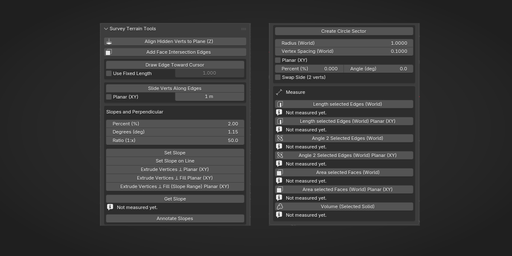
3D Viewport -> N Panel -> Survey -> Survey Terrain Tools

Sections:
1. Align
2. Faces
3. Cursor Edge
4. Slopes and Perpendicular
5. Circles
6. Measure

Installation
  1. Open Blender (5.0+).
  2. Go to Edit -> Preferences -> Get Extensions -> arrow in the upper right corner → Install from Disk.
  3. Select the ZIP file and Click Install from Disk.
Requirements
  • Blender 5.0.0+
  • No external Python packages
Support
  • Email: jan.holinka@seznam.cz
License

GPL-3.0-or-later

Version

Current version: 1.1.0
Detailed history: CHANGELOG.md

Survey Terrain Tools - User Manual

Version: 1.1.0
Blender: 5.0.0+


Overview

Survey Terrain Tools provides terrain-focused modeling and measurement tools in one panel.

Panel location:

3D Viewport -> N panel -> Survey -> Survey Terrain Tools


Align Align Hidden Verts to Plane (Z)
  • 2 verts: computes Z from a vertical-plane rule in XY
  • 3 verts: projects hidden vertices along Z to the infinite plane defined by 3 selected verts
  • Typical workflow: hide vertices to align, keep reference verts visible+selected, run operator

Faces Add Face Intersection Edges
  • Edit Mode, two or more faces selected (they do not need to share an edge or vertex)
  • For every pair of selected faces, builds the line where their planes meet and adds a new edge along the part that lies on both faces (in the mesh)
  • Faces are left unchanged (no deletion); only new vertices/edges may appear
  • Most reliable on convex faces; concave ngons can produce wrong or missing segments

Cursor Edge / Slide Draw Edge Toward Cursor
  • Modal viewport tool with preview line
  • Works in Edit Mode from active/selected vertex
  • Uses panel values: Use Fixed Length + Fixed Length
  • Supports arbitrary mouse-defined angle with precise length control
  • Creates one new vertex and one connecting edge on confirm
Slide Verts Along Edges
  • Slides selected vertices along exactly one connected visible edge
  • Uses panel values: Slide Length and optional Planar (XY) (world XY / plan view)
  • Default: exact entered distance along the 3D edge (world-space length)
  • Planar (XY): Slide Length applies to world XY–projected displacement (movement still follows the edge in 3D); edges with no XY component in world are skipped
  • Ignores hidden edges when checking connectivity
  • Non-matching vertices are skipped

Slopes and Perpendicular Shared slope inputs
  • Percent (%)
  • Degrees (deg)
  • Ratio (1:x)

These values are synchronized.

Set Slope
  • 2 selected vertices
  • Applies Z offset on active/last-selected vertex using current slope inputs
Set Slope on Line
  • Batch mode
  • Supports isolated selected edges or one connected open line
Extrude Vertices ⊥ Planar (mesh XY)
  • Extrudes selected vertices along angle bisector (miter) of connected edges
  • Builds offset line from selected line/loop with adjustable slope on created edges
  • Planar (mesh XY): offset and slope “run” use local XY (edges projected to the mesh XY plane), not world axes unless the object is aligned to the ground
  • Angle Correct Length compensates corners to keep offset width more uniform
  • Includes Swap Sides
Extrude Vertices ⊥ Fill Planar (mesh XY)
  • Same as above, plus side-face fill between neighboring extrusions
  • Supports one open non-branching line and one closed non-branching loop
Extrude Vertices ⊥ Fill (Slope Range) Planar (mesh XY)
  • Like Extrude Vertices ⊥ Fill, but slope varies linearly from Slope from (%) to Slope to (%) along the line
  • Open line only: select one non-branching open line (exactly 2 endpoints); loops are not supported
  • Orientation: active endpoint = Slope to; opposite endpoint = Slope from
  • Dialog: Slope from (%), Slope to (%), Swap From/To (swap from/to in computation)
Get Slope
  • Reads slope from 2 selected vertices
  • Writes result directly below the button in UI
Annotate Slopes
  • Creates slope text + drop-direction arrows at edge midpoints
  • Texts and arrows are always created in a new collection
  • Processes all mesh edges (optional length filter in dialog)
  • Label format in dialog: Percent (%) or Ratio (1:x)

Circles Create Circle Sector 2 selected vertices
  • Creates arc between selected endpoints using Radius (World)
  • If distance > 2R, radius is remapped internally for computation only
  • In remap mode: major arc is used and side is flipped internally for stable behavior
  • UI/Redo still shows the user-entered radius value
  • Default is 3D (tilted arc plane). Enable Planar (XY) to force plan-view arc generation in world XY
  • Tilt can be entered as Percent (%) or Angle (deg) (synchronized); ignored in 3-vertex mode
  • Vertex Spacing (World) controls tessellation density
3 selected vertices
  • Solves true 3D circle from all selected points
  • Generated arc passes through all 3 selected vertices
  • Active vertex does not control arc orientation

Measure (World Space) Length selected Edges (World)
  • Sums world-space lengths of selected edges
Length selected Edges (World) Planar (XY)
  • Sums lengths of selected edges projected onto world XY (plan view; edges vertical in world XY contribute 0)
Angle 2 Selected Edges (World)
  • Requires exactly 2 selected edges in Edit Mode
  • Reports the smaller angle between the two lines in 3D (world space); whether the edges share a vertex does not matter
Angle 2 Selected Edges (World) Planar (XY)
  • Requires exactly 2 selected edges in Edit Mode
  • Projects both edge directions onto world XY (plan view) and reports the smaller angle
  • If an edge has zero planar (world XY) length, the operator reports an error
Area selected Faces (World)
  • Triangulates selected faces (nondestructively) and sums world-space area
Area selected Faces (World) Planar (XY)
  • Triangulates selected faces (nondestructively) and sums their area projected onto world XY (plan view)
Volume (Selected Solid)
  • Computes volume from selected faces
  • Selection must be a closed shell

Troubleshooting Tool does not run
  • Active object must be a Mesh
  • Selection count/type must match tool requirements
  • Most tools require Edit Mode
Circle sector warnings
  • 2-point mode under 2R enters internal remap mode (warning shown)
  • Very small spacing with very large effective radius may hit segment safety cap
  • 3-point mode requires non-collinear points
Slide does nothing
  • Use vertices with exactly one visible connected edge
  • Hide edges to exclude them from slide eligibility
Extrude Vertices ⊥ Fill (Slope Range) Planar (mesh XY) fails
  • Selection must be one open non-branching line (exactly 2 endpoints)
  • Loops and branching selections are not supported
Volume fails
  • Selected faces must form a closed shell
  • Each boundary edge must belong to exactly 2 selected faces

Release Notes

See CHANGELOG.md for version history.

By

Author avatar Jan Holinka

File size

4.6 MiB

Version

1.1.0

Platforms

windows-x64, macos-arm64, linux-x64, macos-x64, windows-arm64

Tmeasure v1.1
Free

add-on Tmeasure v1.1

36
Quad Bridge
Free

add-on Quad Bridge

33
Measure and Scale
Free

add-on Measure and Scale

28
Subdivide Selected
Free

add-on Subdivide Selected

25
Booleanbite: 1-Click Procedural Edge Damage For Blender

add-on Booleanbite: 1-Click Procedural Edge Damage For Blender

15
Final Topology for Artists
Full Plan

add-on Final Topology for Artists

10
Body_Sculptor
Free

add-on Body_Sculptor

9
item transform
Free

add-on Item transform

7
Card/Keychain w/ Custom Design and QR Generation and opt. NFC Cavity for 3D Printing
Free

add-on Card/Keychain w/ Custom Design and QR Generation and opt. NFC Cavity for 3D Printing

6
Optiloops

add-on Optiloops

5
Autoremesher NOW! | Automatic Remeshing

add-on Autoremesher NOW! | Automatic Remeshing

5
HUD & UI Elements

add-on HUD & UI Elements

5
Survey Terrain Tools – Geodetic & Construction Workflow

add-on Survey Terrain Tools – Geodetic & Construction Workflow

5
Final Topology for CAD professionals

add-on Final Topology for CAD professionals

4
Profiler
Full Plan

add-on Profiler

4
Modular Suburban House Creator

add-on Modular Suburban House Creator

4
"Cracks" Damage addon 💥Windows, Linux, Mac approved

add-on "Cracks" Damage addon 💥Windows, Linux, Mac approved

4
Cut & Wrap (One Click Image To Cutout And Shrinkwrap)

add-on Cut & Wrap (One Click Image To Cutout And Shrinkwrap)

4
Align Toolkit

add-on Align Toolkit

3
Hedge It!

add-on Hedge It!

3
Object Bender

add-on Object Bender

3
Quadify Pro — Studio & Automation Edition

add-on Quadify Pro — Studio & Automation Edition

3
Modifiers Toolbox

add-on Modifiers Toolbox

2
Quick Lattice

add-on Quick Lattice

2
  • «
  • 1
  • 2
  • 3
  • …
  • 5608
  • 5609
  • 5610
  • »
Added To Cart
To complete your purchase or update it, please go to cart. If you want to find more awesome add-ons, continue to explore.
Go to Cart
Already Purchased
You already purchased this item. It is impossible to buy it again. Continue to explore and enjoy :-)
My Orders