
 Models
 Materials
 HDRIs
HDRIs
 Scenes
 Brushes
 Node Groups
 Printables
 Creators
 Creations
DRH - Dual Units
 add-on
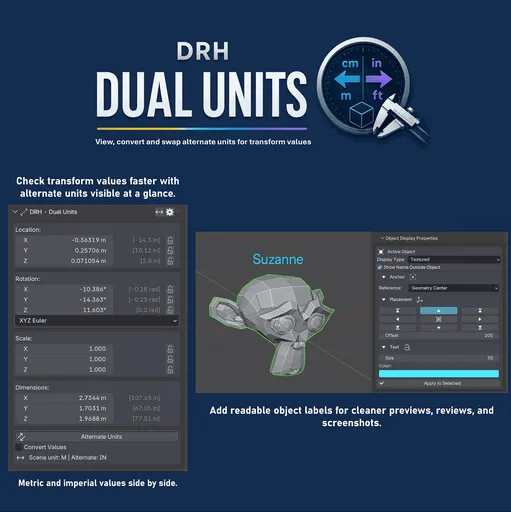
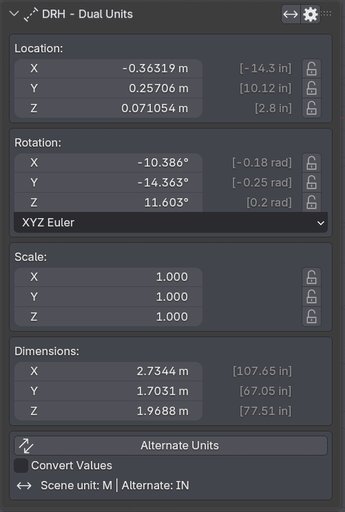
Emulate Blender’s default Transform panel with a dual-unit view in the N Panel. DRH - Dual Units lets you visualize Location, Rotation, Scale, and Dimensions with both scene units and alternate units side by side.
Why DRH - Dual Units
Text Content
DRH - Dual Units is designed to emulate Blender’s default Transform panel inside the N Panel, while adding the dual-unit visibility Blender does not provide by default.
Since Blender does not allow its native Transform panel to be replaced, this add-on gives you a familiar transform-style panel where you can view your active scene units and alternate units side by side.
You can check Location, Rotation, Scale, and Dimensions with converted alternate values visible directly beside the original transform values.
The main goal is simple: make metric and imperial workflows easier to understand at a glance.
Ideal for artists, modelers, technical creators, and anyone who works between different unit systems.
Introductory price: $4.99 USD.
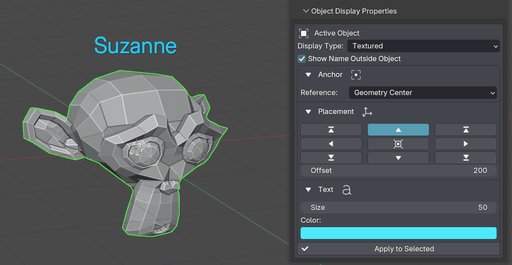
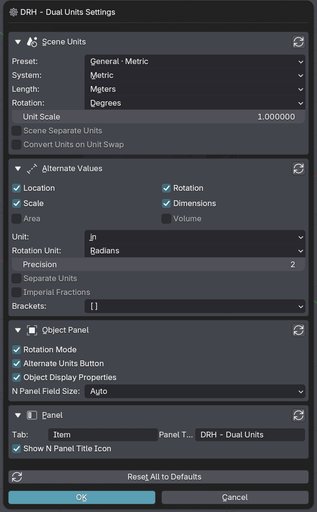
What You Can Do
- Emulate Blender’s default Transform panel with a familiar N Panel layout
- View scene units and alternate units side by side
- Check Location, Rotation, Scale, and Dimensions without manual conversion
- Work more comfortably between metric and imperial unit systems
- Convert transform values when needed for faster measurement review
- Swap alternate unit settings to match your current workflow
- Lock and edit transform values from a familiar transform-style interface
- Reduce unit confusion during modeling, scale checks, and object review
- Improve communication when clients, references, or collaborators use different units
Block Heading Faster Dual-Unit Transform Viewing
DRH - Dual Units focuses on the part of Blender where measurements matter most: the Transform values in the N Panel.
Because Blender does not allow its default Transform panel to be replaced, this add-on emulates that familiar layout and adds a clearer dual-unit workflow on top of it.
You can keep working with your active scene units while viewing alternate converted values directly beside:
- Location
- Rotation
- Scale
- Dimensions
This is especially useful for:
- metric and imperial workflows
- scale checking
- product modeling
- architectural visualization
- reference-based modeling
- client-friendly measurement review
- technical asset preparation
Work With Metric and Imperial Values Side by Side
Many Blender projects involve mixed measurement expectations.
You may build a scene in meters, receive references in inches, review dimensions in feet, or need to communicate measurements to someone using a different unit system.
DRH - Dual Units helps by showing alternate unit values directly in a transform-style N Panel interface, so you can understand both systems at a glance without constantly changing Blender’s unit settings.
This helps with:
- reducing conversion mistakes
- checking object dimensions faster
- reviewing scale more clearly
- working across metric and imperial requirements
- preparing models for clients, teams, and technical workflows
Designed to Feel Familiar
DRH - Dual Units is designed to feel close to Blender’s native Transform panel, while adding the missing dual-unit visibility many workflows need.
The goal is not to replace Blender’s built-in panel. Instead, it provides a familiar emulated transform panel where alternate units can be viewed beside the original transform values.
Use it when you need to:
- verify model size
- compare unit systems
- review dimensions quickly
- keep alternate units visible while modeling
- avoid switching unit settings just to understand a measurement
Simple Utility and Clear Production Value
Small measurement issues can create bigger production problems later.
A clearer dual-unit workflow helps you catch scale mismatches earlier, communicate dimensions better, and move through modeling tasks with fewer interruptions.
DRH - Dual Units gives Blender users a focused way to handle mixed-unit needs directly in a transform-style N Panel layout.
Less manual conversion. More confidence while modeling.
Requirements and Installation
- Download the ZIP from this product page
- In Blender, go to Edit > Preferences > Add-ons > Install...
- Choose the downloaded ZIP file
- Enable DRH - Dual Units
- Open the N Panel and use the DRH - Dual Units panel
After enabling, use the add-on to view transform-style values with alternate units shown side by side.
Compatibility
Version: 1.0.0
Blender: 4.2+
Location: N Panel > DRH - Dual Units
Platforms: Windows, macOS, Linux
This is a source-based Blender add-on focused on dual-unit transform visualization.
It is designed to help artists and technical creators work more comfortably across metric and imperial unit requirements without relying on constant manual conversions.
Documentation and Support
Public support is handled on GitHub:
https://github.com/pacosalasv/DRH_Dual_Units-Support
Use the GitHub support page for:
- installation help
- compatibility questions
- bug reports
- feature requests
- workflow guidance
User Manual (PDF)
https://github.com/pacosalasv/DRH_Dual_Units-Support/blob/main/docs/manual/user-manual.pdf
Need help or have a question? Open an issue or discussion on the support page so updates and answers can stay organized for all users.


