Unconventional thumbnails 🔗
Materials 🔗
Please use only standard BlenderKit previews for materials. Ideally, stick to the Sphere preview.
Of course, if you are creating fire or similar effects, this rule doesn't apply to your material.
FYI, sometimes thumbnails are rerendered during validation with the internal thumbnailer.
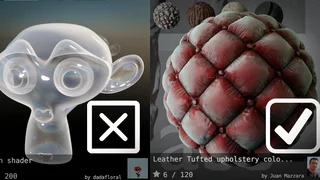
Models 🔗
Use only square format renders of models for thumbnails. Render thumbnails with Cycles and include a background. It is important to present shadows and how beautiful your model looks when rendered.
You can always use the default thumbnailer in the add-on, which produces decent results.
No text in thumbnails 🔗
Don’t use text in your thumbnails because of the following reasons:
- Overlaps: In the add-on view and other views, your text can overlap with other texts.
- Unnecessary duplication: You can write everything you need about the asset (brand, name, etc.) in the asset description field.
- Font issues: BlenderKit has a unified graphic look. Even if you use amazing fonts, they won’t match it and things can get strange.
And, yes. Sometimes we tolerate text in thumbnails of exceptionally great assets. However, we try to remove it whenever possible. So, please don’t contact us asking “If he can do it, then why can't I?”. Just trust us that we want the best for our library.
Thanks for understanding!