Texel density in Blender 🔗
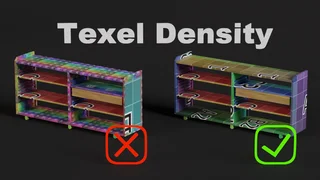
Texel density shows how big the texture pixels will be in a scene. A pixel can correspond to 1mm2, etc.
When creating models, it is usually optimal to keep the texel density the same throughout the model. Be aware of it when unwrapping the UV map.
The exception may be when you want to increase detail level in a part of model- for example, the face and hands of a character.
Blender has an excellent tool for checking texel density. You can create a new image and set the 'Generated Type' to 'UV Grid' or 'Color Grid' when you create it. You can use such an image in your material to view the quality of your UV map. If the individual squares of the grid are the same size, the texel density on your model is evenly distributed.
Have a look at this YouTube tutorial to understand more.
This tutorial comes also with an add-on to check texel density.
Thanks and good luck!