How to name and describe assets? 🔗
Naming your assets 🔗
Think of all internet users worldwide when naming your assets. Everyone should understand what it is from its name.
- Don't use numbering like 01, 02 or other cryptic designations like `Sofa A` and so on.
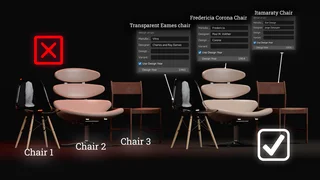
- When it comes to furniture, always use the name of the design and manufacturer. List it in the asset name, but also in the manufacturer, design collection and designer entry.
Describing your assets 🔗
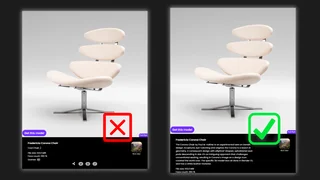
Describing your asset is a very important part of your upload. It makes you money. Literally.
The description helps others know how to use your asset. Especially if it's a 3D scene template, a model with geometry nodes and so on.
Moreover, search engines use the descriptions to find your work. This is true not only for BlenderKit but also for Google. Without a verbal description, your work will hardly be found.
So, be descriptive, be creative and write only in English. A good description should have at least several sentences.
English only 🔗
Since we want our Blender friends from all around the globe to understand us, we only use English for names and descriptions.
Using English also gives you better results on Google and other search engines.
If your English is not great, try translating with the open source Deepl translator, which generates high quality texts.

HOW IMPORTANT ARE GOOD TAGS? 🔗
Tags are short words that describe assets as accurately and broadly as possible.
You may think tags are a waste of time, but statistically- good tags can increase the income from a model by 2-3 times.
It is through tags that users find your assets. Therefore, put time into choosing words that describe them best.
Thanks for reading and make that money honey!