How to reduce model file size in Blender? 🔗
BlenderKit models are meant to be used in complex scenes and our users also love to export them into game engines. So in our case, size actually matters.
Additionally, if your file size is too big, your viewport may get stuck, or you may run out of memory with the Cycles renderer.
This article will explain how to reduce the file size of your models.

Subdivision surface modelling 🔗
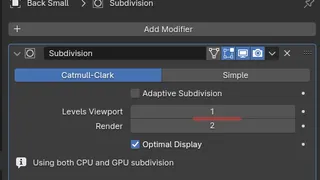
When using subdivision surface modeling, never apply the subdivision surface modifier. Also, keep the render resolution just right for smooth shapes, but never go higher than needed.
Don't also apply the multiresolution modifier- keep it or bake your maps to the lowest possible resolution and then use subdivision surface modifier with displacement modifier to keep the detail.

Starting with high poly models like scans or dyntopo meshes? 🔗
Use Decimate modifier and bake normal maps.
Textures and materials 🔗
High-resolution textures are welcome since BlenderKit server generates lower resolutions from them and sometimes you just need the extra resolution for the best detail. Modern game engines can also deal with high resolution textures and take care of the detail. However, don't use a 4k texture for a spoon or a cup.
Don't use many materials on a single model/object. Always make unique UV maps and PBR image sets in a suitable app. PBR material system can combine many materials in just a few texture maps.
Thanks and hope life just got lighter!
Keep the viewport subdivision levev as low as possible for real-time editing 🔗
Keeping the subdivision level low is crucial for real-time editing because higher subdivision levels increase the computational complexity and can slow down the viewport's responsiveness. By maintaining a low subdivision level, the software can allocate more resources to other real-time operations, such as manipulating objects, updating textures, and previewing changes. This ensures a smooth and responsive editing experience, allowing you to work efficiently without lagging or stuttering issues.