04 June 2022

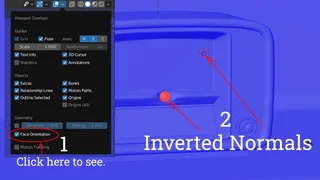
Inverted normals 🔗

The normals on your model can sometimes be inverted.

Here is the quickest way to fix it:

  1. Go into edit mode (TAB key),
  2. Mark everything with the shortcut A
  3. Go to Mesh->Normals (ALT+N)
  4. Select recalculate outside (or inside if your model is a room or similar object).

If you want to know more about normals, watch this tutorial:
See next articles

Not printable

Great creators value respect and collaboration

Incorrect category or style

This guide explains why choosing the right category and style is crucial when uploading 3D assets, and how it affects search and validation results.

Incorrect UV mapping

This guide highlights common UV mapping mistakes in 3D assets and offers tips to avoid texture distortion and incorrect projection.

Inappropriate Behavior

Great creators value respect and collaboration

No AI Assets

Say no to AI, Stand with Artists