
 Models
 Materials
 HDRIs
HDRIs
 Scenes
 Brushes
 Node Groups
 Printables
 Creators
 Creations
DAE Exporter (Blender 5.0+ Compatible)
 add-on
Native-grade COLLADA (.dae) exporter for Blender 5.0+ with Safe Transforms, N-gon triangulation, and auto-texture copying optimized for SketchUp & 3ds Max.
$5
$4.25
🚀 Export COLLADA (.dae) Files to SketchUp & 3ds Max Directly from Blender 5.0+
🔥 Key Features:
📦 What's Included:
As of Blender 5.0, native COLLADA (.dae) export support has been permanently removed from Blender's core codebase. This presents a major obstacle if your workflow relies on transferring clean 3D assets from Blender to CAD/DCC software like Trimble SketchUp or Autodesk 3ds Max.
The SketchUp DAE Exporter solves this limitation by integrating a custom-engineered Python-only COLLADA exporter directly inside the addon. It completely bypasses Blender's native exporter, delivering highly compliant .dae files with one-click optimizations.
🔥 Key Features:
- Blender 5.0+ Ready: Works seamlessly on the newest Blender versions without needing any legacy C++ plugins or older Blender versions.
- Safe Transforms Workflow: Automatically creates a temporary duplicate of your selected geometry, applies all scales, rotations, and locations to world-space, and exports the clean, optimized mesh. Your original scene objects remain 100% untouched.
- N-gon Triangulation: Automatically triangulates polygons during export to ensure SketchUp and 3ds Max render the geometry perfectly without missing or broken faces.
- Smart Texture & Material Export:
- Automatically scans your materials' Principled BSDF shader node trees.
- Copies any associated image texture files (including packed assets) directly to the destination folder next to the DAE file.
- Writes clean relative file paths inside the DAE file so that SketchUp imports textures automatically.
- Diffuse Color Fallback: If an object uses solid colors instead of textures, the exporter extracts the exact base RGBA color from the material's Principled BSDF node and includes it in the DAE export.
📦 What's Included:
- A clean, modern, single-file lightweight Blender addon.
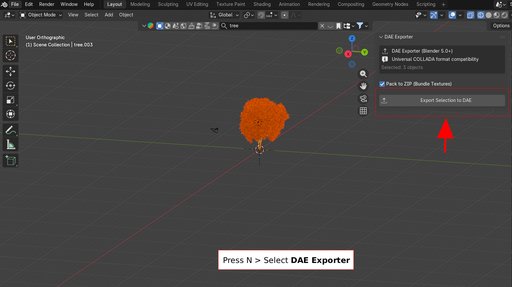
- Sidebar panel integration under the SketchUp tab for instant exports.
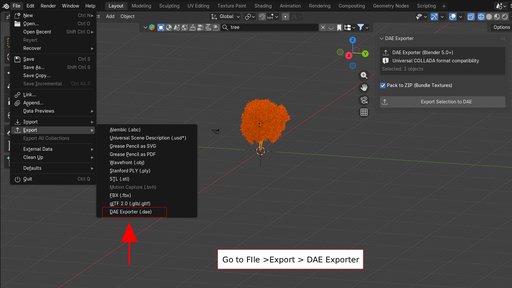
- File menu integration under File > Export > SketchUp DAE (.dae).
🛠️ How to Use:
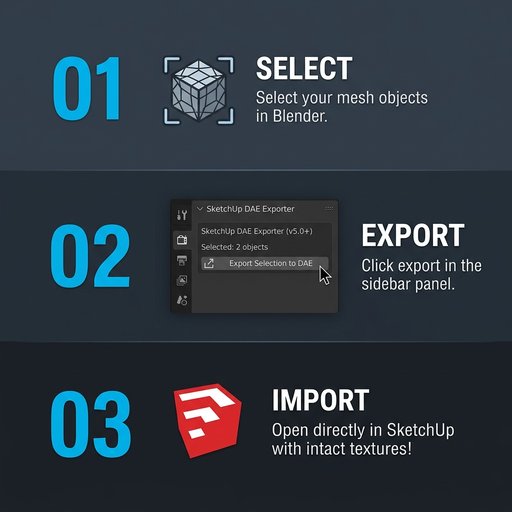
- Select the Mesh Objects in your 3D Viewport that you want to export.
- Open the Sidebar Panel (press N in the 3D Viewport) and click on the "SketchUp" tab.
- Choose your destination directory and filename.
- Click "Export Selection to DAE" (or go to File > Export > SketchUp DAE (.dae)).
- Import the exported DAE file directly into SketchUp or 3ds Max—all geometry will be perfectly applied, and all textures/materials will load automatically!


