BlenderKit logo
  • Download BlenderKit
  • Subscribe
  • Mission
  • Users
    • Info for users
      • FAQ
      • Get Blender add-ons
      • BlenderKit in Godot
      • Add-on troubleshooting
      • Licenses
      • Licenses FAQ
    • Terms & conditions
      • Terms and Conditions
      • Privacy Policy
      • Refund Policy
    • Service status
    • Cookies
      • Cookie Policy
      • Cookie settings
  • Creators
    • Overview
    • FAQ
    • Terms and Conditions for creators
    • General Uploading info
    • Upload Models
    • Upload Materials
    • Upload Brushes
    • Upload Add-ons
    • Upload Scenes
    • Upload HDRs
    • Upload Printables
    • Guidelines for add-on creators
    • Blender Tutorials
    • Validation Statuses
    • Fair Share Redistributions
    • Affiliate program
    • Most common upload issues
  • News
  • About
    • Our team
    • Contact
    • Press Kit
    • Blender 3D Training
    • Job positions
  • BKON 2026
  • Models
  • Materials
  • HDRI
  • Scenes
  • Brushes
  • PrintablesNEW
  • Add-onsNEW
  • Log In
  • Register

BK BD 25

Blender 3D General Add-Ons

Free Plan

Get 62,110 free assets

Full Plan

Access the full library & enjoy 131,582 assets

Blender add-ons 15%

Find free & paid Blender add-ons

Become creator

Share & sell your assets

< All assets

Add-ons icon Add-ons

  • Models icon Models
    • Architecture
      • Building
        • Commercial Historic Private Sci-fi
        • other...
        Door Exterior element
        • Bench Facade element Fence Fountain Playground Swimming pool Urban Environment
        • other...
        Floor Covering Molding / Carving Scenes Stairs Structure Wall Panel
        • 3D Panel Stone Panel Upholstery Panel Wood Panel
        • other...
        Window
      • other...
      Character
      • Anatomy
        • Full Body Head Internal organ Limbs Skeleton
        • other...
        Animal
        • Bird Dinosaur Fish Insect Mammal Reptile
        • other...
        Clothing
        • Accessories Footwear Headwear Man Clothing Woman Clothing
        • other...
        Humanoids
        • Child Fantasy Hero/ Heroines Medical Men Military Police Sci-Fi Sports Women
        • other...
        Monster / Creature Robot
      • other...
      Decoration
      • Bag / Suitcase Blanket Book Carpets Clock / Watch Curtain Decoration Set Fabrics Fireplace Food / Drinks
        • Beverage Food Fruit / Vegetable Kitchenware Sweets / Dessert Tableware set
        • other...
        Holiday Decoration Mirror Money Picture Pillow Sculpture Textile Vase Miscellaneous
      • other...
      Effects / Simulations
      • Modifier Motion design Simulations Technical
      • other...
      Industrial
      • Container Equipment Machinery Parts Sign Tools
        • Handtools Powertools
        • other...
      • other...
      Interior
      • Armchair Bathroom furniture
        • Accessories Bathhub Faucet Furniture Set Laundry Shower Toilet / Bidet Towel rail Wash Basin
        • other...
        Bed Cabinets
        • Bookcase Commode Shelving TV Cabinets
        • other...
        Chair
        • Bar Chair Regular Chair
        • other...
        Console Dressing Table Kids furniture
        • Bed Chair Furniture Set Miscellaneous Table Toy Wardrobe
        • other...
        Kitchen Furniture
        • Faucet Kitchen Appliance Kitchen Set Sink Storage
        • other...
        Lights
        • Ceiling Light Floor Lamp IES Light Industrial Light Outdoor Light Table Lamp Wall Light
        • other...
        Office Furniture
        • Chair Desk Stationery Storage Table
        • other...
        Outdoor Furniture Pouf Restaurant / Bar Seating Set
        • Chair-table Set Sofa-table Set
        • other...
        Shopping / Retail Sideboard / Drawers Chest Sofa Table Wardrobe
      • other...
      Military
      • Aircraft Vehicles Watercraft Weapon / Armor
        • Historic Modern Sci-Fi
        • other...
      • other...
      Nature
      • Atmosphere
        • Cloud Fog Smoke / Fire Wind Setup
        • other...
        Grass Landscape
        • Environment Elements Terrain
        • other...
        Plant
        • Bouquet Fitowall Indoor Outdoor
        • other...
        Tree
      • other...
      Science
      • Lab Equipment Medical Equipment Microbiology Miscellaneous Pharmacy
      • other...
      Space
      • Miscellaneous Planet Satellite Spacecraft Station
      • other...
      Sport / Hobby
      • Fishing Gym Hobby Accessories Miscellaneous Music
        • Accessories Instruments Stage Studio
        • other...
        Sport
      • other...
      Technology
      • Audio Devices Computer
        • Components / Hardware Desktop Game Console Keyboard Laptop Monitor Mouse Peripheral
        • other...
        Device
        • Cellular Phone Corded Phone Smartphone Smart Watch Tablet
        • other...
        Home Appliance Miscellaneous Photography Robotics Video devices
      • other...
      Transport
      • Aircraft
        • Accessories / Part Air Baloon Airplane Drone Glider Helicopter Historic Plane Private Jet Seaplane
        • other...
        Bicycle Car
        • Buggy Concept Historical Luxury / Supercar Modern Racing Sci-Fi
        • other...
        Emergency
        • Ambulance Fire trucks Police
        • other...
        Heavy Vehicle
        • Industrial Trailer Truck Van
        • other...
        Motocycle
        • Historical Race Standard
        • other...
        Public Transport
        • Bus Taxi
        • other...
        Railed vehicle
        • Cargo Passenger
        • other...
        Small Electric Vehicles Vehicle Parts Watercraft
        • Accessories / Part Boat Hovercraft Ship Submarine Yacht
        • other...
      • other...
    • other...
  • Materials icon Materials
    • Animal Asphalt Bricks Ceramic Concrete Dirt Fabric
      • Blackout Chenille Dimout Embroidery Flat weave Jacquard Print Sheer Suede Texture Velvet Vinyl / Imitation leather
      • other...
      Floor Food Fx Glass Grass Ground Human Ice Leather Liquid Marble Metal Organic Ornaments Paper Paving Plaster Plastic Rock Roofing Rubber Rust Sand Soil Stone Tech Tiles Wood
    • other...
  • HDRIs icon HDRIs
    • Indoor
      • Abstract Futuristic Environments Holiday Industrial Interiors Nighttime Environments Public Residential Rural Sports Studio
      • other...
      Outdoor
      • Abstract Architectural Cityscapes Futuristic Environments Holiday Landscapes Nature Nighttime Environments Sports Urban Water Environments
      • other...
    • other...
  • Scenes icon Scenes
    • Abstract Cartoon Exterior
      • Architectural Nature Post-apocalyptic Private Public Rural Urban
      • other...
      Gaming Industrial Interior
      • Creative studios
        • Photography Studios TV Studios YouTube/Podcast Studios
        • other...
        Interior Isometric Private Public
      • other...
      Product visualization
      • Cloth viz Mockup Studio
      • other...
      Science Templates
      • Background Brush templates Magazine cover Typography Validation scenes
      • other...
      Thematic Scenes
      • Fantasy Historical Holiday Sci-fi Space Underwater
      • other...
    • other...
  • Brushes icon Brushes
    • Anatomy
      • Animal / creature
        • Claws Face / head Feather Fins Fur Limbs Organs Scales Scars & wounds Skeleton Skin Spikes Tails & horns
        • other...
        Human
        • Body Face Hair & nails Muscles Organs Scars & wounds Skeleton Skin
        • other...
      • other...
      Art
      • Pattern Sculpture
      • other...
      Clothing
      • Accessories Fabric Stitches
      • other...
      Damage
      • Concrete Crack Cut Dirt Glass Metal Plaster Rust Wood
      • other...
      Geometric Industrial
      • Hard surface Sci-fi
      • other...
      Misc Nature
      • Crater Fire Ice Landscape Organic Plant Rock Soil Stone Wood
      • other...
    • other...
  • Node Groups icon Node Groups
    • Compositing Nodes Geometry Nodes
      • Curves
        • Curve Deformers Curve Optimizers Curve Shapes
        • other...
        Distribution
        • Arrays Distribution Transform Surface Distribution Volumetric Distribution
        • other...
        Generators
        • Animations Curve Generators Measurements Mesh Generators Voxel Generators
        • other...
        Material
        • Colors
        Math
        • Functions
        Selection
        • other...
        Simulation
        • Diffusions Particle Physics
        • other...
        Tools
        • Edit / Object mode
        • other...
        Topology
        • Mesh Deformers Mesh Primitives Remeshers Tessellate Mesh
        • other...
        Utilities
        • Rotation Switches Text / String Tools UV Vector Fields
        • other...
      • other...
      Shading Nodes
      • Effects Procedural Textures
      • other...
  • Printables icon Printables
    • Containers Fashion Games Holders Instruments Mechanics Misc Organics
    • other...
  • Add-ons icon Add-ons
    • 3D View Add Mesh Animation Development General Import - Export Material Mesh Modeling Node Object Paint Render Rigging Scene System Tools User Interface UV
  • Creators icon Creators
  • Creations icon Creations

What is BlenderKit?

BlenderKit is a community‑driven 3D asset library integrated into Blender 3D.

Founded in the spirit of open‑source, BlenderKit is available for free.

With a Full Plan subscription, users support BlenderKit creators and open‑source development, while enjoying access to the full database.

Find out more
YouTube Facebook Instagram GitHub TikTok BlueSky
  • Trending  
  • Most bookmarked  
  • Highest asset score  
  • Highest complexity  
  • Highest quality  
  • Asset count  
  • Asset score sum
  • Newest
  • Most relevant
  • All
  • Free
  • Full
  • Paid
  • All assets
  • My bookmarked assets
  • All
  • 0 - 999
  • 1,000 - 9,999
  • 10,000 - 99,999
  • 100,000 - 999,999
  • 1,000,000 and more
  • All
  • Less than 256
  • 256
  • 512
  • 1K
  • 2K
  • 4K
  • 8K
  • 16K and more
  • All
  • Sculpt
  • Texture paint
  • All
  • Procedural
  • Texture based
  • All
  • Realistic
  • Non photorealistic
  • Other
  • All
  • Yes
  • No
  • All
  • Geometry nodes
  • All
  • Yes
  • No
  • All
  • Yes
  • No
  • All
  • No Sexualized Content
  • Sexualized Content
  • All
  • Yes
  • No
  • All
  • Windows
  • MacOS
  • Linux
  Bookmarks
The asset was added to your bookmarks.
Now you can filter it in BlenderKit add-on.
  Bookmarks
The asset was removed from your bookmarks

Quick Asset Manager

add-on add-on

Quickly Create, Edit, Organize, or Delete your local asset files.

Free for everyone
download
Share on Twitter Share on Facebook Share link
Image 1

Blender’s Asset Library is powerful, but managing your own assets is unnecessarily tedious. Saving assets takes too many steps, and once they’re saved, Blender offers no easy way to rename, edit metadata, reorganize catalogs, or delete assets without manually opening files.

Quick Asset Manager fixes that.

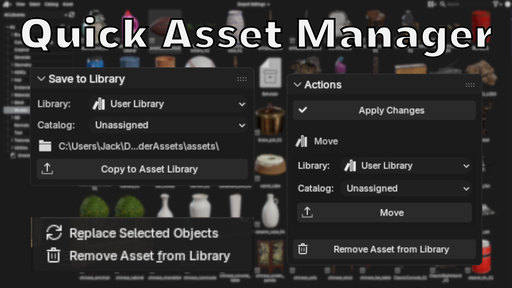
It lets you save assets directly to your configured libraries with full metadata support, then manage those assets in place. Rename them, edit metadata and tags, move them between catalogs or libraries, swap them into scenes, or delete them entirely. No file hunting. No opening .blend files just to make a small change.

Features
  • Direct Save: Save selected assets to any configured Blender library with one click, including optional catalog assignment.
  • Editable Saved Assets: Edit any metadata fields or tags you desire in your saved assets
  • Move & Organize: Move assets between catalogs or entire libraries without touching the filesystem
  • Swap Assets: Replace selected scene objects by right-clicking any object or collection asset.
  • Bulk Operations: Move multiple assets at once, or bundle them into a single .blend file for easy sharing.
Usage Saving Assets
  1. Open the Asset Browser and switch to Current File view
  2. Select an asset you want to save
  3. Open your tool panel (N by default)
  4. Configure the asset name, catalog, and metadata as needed
  5. Choose your target library and optional catalog from the dropdowns
  6. Click Save to Asset Library
Editing Assets
  1. Open the Asset Browser and select any already saved asset
  2. Open your tool panel (N by default)
  3. Change any metadata field as needed
  4. Choose Apply Changes
Moving Assets
  1. Open the Asset Browser and select any already saved asset
  2. Open your tool panel (N by default)
  3. At the bottom of the panel choose a new library and/or catalog destination
  4. Choose Move
Swapping Assets
  1. Ensure an item is selected in your scene
  2. Open the Asset Browser and find any already saved asset
  3. Right Click your desired asset and choose "Swap with active objects"
    (Note: Only works for collection and object assets)
Bundling Assets
  1. Open the Asset Browser and switch to a configured library
  2. Select the assets you want to save
  3. Continue from the Quick Asset Bundler panel in the sidebar to the left
  4. Choose your target save directory
  5. Configure the bundle name, catalog copy, and overwrite settings
  6. Click Bundle and wait for your bundle to complete!

The addon will:
- Create a bundled.blend file with all your selected
- Automatically pack all required images and dependencies
- Apply all metadata and catalog assignments
- Save to your chosen directory with proper file naming
- Optionally save a copy of your catalog (categories) file

Support me

If this tool saves you time, consider supporting development. It helps fund updates and the replacement of my dead GPU 😅.

Features
  • Direct Save: Save assets to any configured Blender library with one click
  • Full Metadata: Set name, description, author, license, copyright, tags, and catalog
  • Smart Defaults: Configure default metadata in preferences to speed up your workflow
  • Catalog Support: Automatically reads and assigns assets to library catalogs
  • Conflict Handling: Choose to increment, overwrite, or cancel when files already exist
  • Auto-Refresh: Optionally refresh the asset browser after saving
  • Cross-Platform: Uses Blender's native path handling for Windows, Mac, and Linux
Usage Setup
  1. Install the addon in Blender (Edit > Preferences > Add-ons)
  2. Configure your default library and metadata in addon preferences
  3. Ensure you have at least one asset library configured in Blender (Preferences > File Paths > Asset Libraries)
Saving Assets
  1. Open the Asset Browser and switch to Current File view
  2. Select an asset you want to save
  3. Continue from the the Quick Asset Saver panel in the sidebar to the left
  4. Choose your target library from the dropdown
  5. Configure the asset name, catalog, and metadata as needed
  6. Click Save to Asset Library

The addon will:
- Create a standalone lightweight .blend file with your asset
- Automatically pack all required images and dependencies
- Apply all metadata and catalog assignments
- Save to your chosen library with proper file naming

Preferences

Set default values that will auto-populate when selecting assets:
- Default Asset Library: Your preferred library for saving
- Default Author: Your name or organization
- Default Description: Standard description text
- Default License: License for your assets
- Default Copyright: Copyright notice
- Auto-Refresh: Toggle automatic asset browser refresh

Requirements
  • File access
  • At least one configured asset library
Support me

If you’d like to support my Blender development (or help me replace my fried GPU 😅), you can donate here: https://buymeacoffee.com/clonephaze

2.0 Overhaul!


Major Changes
  • New Panel Layout — All panels now live in blenders native tool menu! (N-panel in the asset browser)
  • Full companion file support — textures, thumbnails, metadata, HDRIs, docs, and asset-named folders move and delete together.
  • Improved delete behavior — removes all related files, cleans up empty folders, and sends everything to the system Trash.
New Features
  • Move assets between libraries and catalogs with full data preservation.
  • Edit metadata for existing library assets.
  • Replace scene objects with library assets.
  • Bundle multiple assets into shareable .blend files.
Improvements
  • Correct catalog assignment when moving assets with companions.
  • Handles multi-asset .blend files intelligently.
  • Automatic cleanup of empty folders after move/delete.
  • Safer, clearer feedback with detailed counts and logging.
By

Author avatar Clonephaze Smith

File size

730.1 KiB

Version

2.0.3

Platforms

windows-x64, macos-arm64, linux-x64, macos-x64, windows-arm64

Flow5 - The Ultimate Asset Tool

add-on Flow5 - The Ultimate Asset Tool

41
Quick Asset Manager
Free

add-on Quick Asset Manager

14
EZ Studio Pro

add-on EZ Studio Pro

12
QuickUndo: Sidebar Undo/Redo for All Modes
Free

add-on QuickUndo: Sidebar Undo/Redo for All Modes

10
BSAT - Reference plan scaling

add-on BSAT - Reference plan scaling

9
BagaPie
Free

add-on BagaPie

7
Season Slider

add-on Season Slider

7
Music Generator
Free

add-on Music Generator

6
Alt Tab Easy Fog 2

add-on Alt Tab Easy Fog 2

6
Alt Tab Easy Hdri

add-on Alt Tab Easy Hdri

6
Quick Align

add-on Quick Align

5
Add-on Install button
Free

add-on Add-on Install button

4
Chain Generator

add-on Chain Generator

4
Alt Tab Colorful

add-on Alt Tab Colorful

3
BB Toolkit Pro

add-on BB Toolkit Pro

2
Alt Tab Lighting

add-on Alt Tab Lighting

2
Alt Tab Pixel

add-on Alt Tab Pixel

2
Product Display Generator

add-on Product Display Generator

2
Null Game Toolkit

add-on Null Game Toolkit

2
Timelapse Studio V1.0

add-on Timelapse Studio V1.0

1
Falconcam

add-on Falconcam

1
Idea Gen

add-on Idea Gen

1
Mass Renamer Pro

add-on Mass Renamer Pro

1
Credit Manager Pro

add-on Credit Manager Pro

1
  • «
  • 1
  • 2
  • 3
  • …
  • 5608
  • 5609
  • 5610
  • »
Added To Cart
To complete your purchase or update it, please go to cart. If you want to find more awesome add-ons, continue to explore.
Go to Cart
Already Purchased
You already purchased this item. It is impossible to buy it again. Continue to explore and enjoy :-)
My Orders