Get free assets
Access the full library & enjoy assets
Find free & paid Blender add-ons
Share & sell your assets
BlenderKit is a community‑driven 3D asset library integrated into Blender 3D.
Founded in the spirit of open‑source, BlenderKit is available for free.
With a Full Plan subscription, users support BlenderKit creators and open‑source development, while enjoying access to the full database.
HOW TO USE —
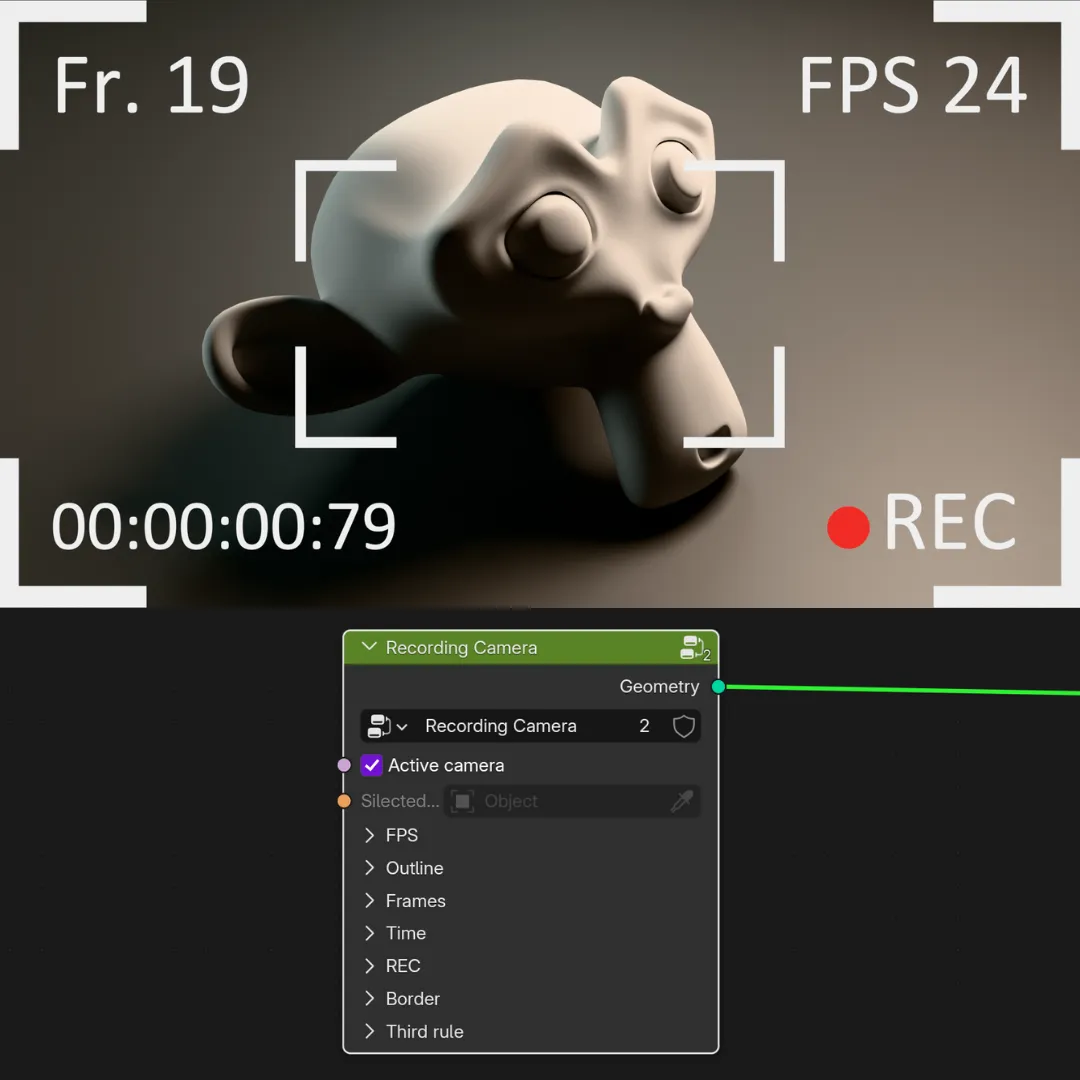
This node group creates a realistic camera recording overlay effect (like FPS counter, timer, REC symbol, and framing lines) — perfect for cinematic renders or UI visuals.
Using this node group is extremely simple:
Just add any object (like a plane or a simple mesh object).
Apply a Geometry Nodes modifier to that object.
Inside the Geometry Nodes editor, insert this node group.
By default, the overlay will automatically follow the active camera in your scene.
If you want to apply the effect to a specific different camera instead, simply disable the Active Camera option and manually select any camera you want from the camera selector.
Outline option:
You can enable the Outline to add a high-contrast border style to the overlay, making it more visible and stylistic.
Note:
If nothing is visible or the overlay appears too big or out of place, simply adjust the object’s scale or move its location. This helps position the overlay properly in front of the camera view.