Grass and particle systems drag & drop 🔗
Literally every area you step in Blender requires you to learn a lot of new tools and information, and that's why we implemented several 'shortcuts' for convenience and speed.
One that you are probably familiar with is automap - simple world-scaled UVs, which are created as soon as you drag & drop a material on any object in your scene.
A new one is drag & drop of particle systems (only in Blender 2.8). For a user it's the simplest thing in the world - you can drag & drop a prepared grass setup directly to any object (not a linked object, but one that is in your file). Hit render and voila! There's your empty lot filled with a lawn. Test this with these 2 assets in the database - Grass lawn cut 1 x 1 m (free model) and Grass 1 x 1 m basic uncut.
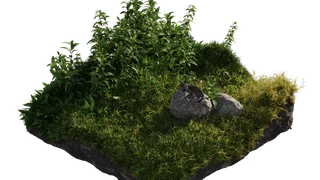
For those who already know or want to learn about particle systems - this tool copies all the particle systems from the asset file and applies them to the target mesh, but also calculates how many square meters are the surface of the mesh and recalculates particle density. In viewport, a maximum of displayed particles is then reduced, because if you drag & drop to larger meshes, your machine could simply crash when trying to display millions of particles with viewport or EEVEE. In Cycles render however, everything is optimised so almost any computer can render quite a lot of grass.
Creators can create patches of pre-made systems like grass or similar.
These are supposed to be uploaded as a 1 x 1 m (Blender unit) plane objects with the particle systems on them. This way the BlenderKit add-on can correctly derive the correct number of particles the user should have on his object, so your grass, plants, or other particles look as similar as possible to your original. Blender 2.8 add-on has a new toggle, area particle system, which lets the add-on know your asset is this type of system. Show us what plants you can create and upload! And the beautiful part is, in the end you can create beautiful environments that consist of assets from many fellow artists, all together.