Export Each - Batch Export Collections / Object with One Click
Simplify your Blender export workflow! Export Each lets you batch export multiple objects or collections with one click
Blender add-on built to save you hours of repetitive work when exporting multiple assets.


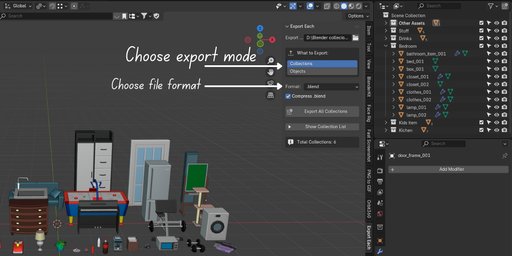

⚡ Quick Start Your First Export (30 seconds)
-
Open the Panel Press N in 3D Viewport Click "Export Each" tab
-
Choose Export Path Click the folder icon Select where you want files saved
-
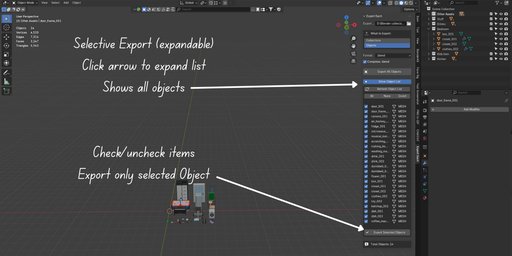
Select Mode "Collections" (default) or "Objects"
-
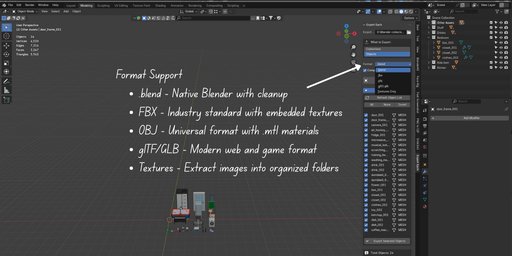
Select Format Choose from dropdown (e.g., FBX)
-
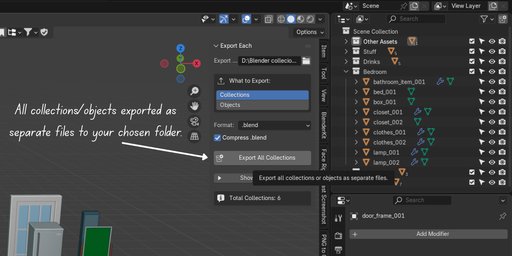
Export Click "Export All Collections" or "Export All Objects"
Done! ✅ Result: All collections/objects exported as separate files to your chosen folder
🎯 Perfect For
Game developers
3D environment and prop artists
Asset library creators
Studio pipelines
Anyone working with large 3D projects
💡 Why You’ll Love It
Export hundreds of assets in minutes instead of hours
Zero manual renaming or texture management
Keeps your workflow clean, organized, and consistent
Works perfectly with Blender’s built-in export formats