Pomodoro Timer
Boost your productivity with this amazing N-Panel widget! If your computer cannot render faster, work smarter! This add-on integrates seamlessly into Blender, offering structured work sessions and breaks to keep you immersed in creative projects!
What is Pomodoro?
The Pomodoro Technique, created by Francesco Cirillo in the 1980s, is a time management method that breaks work into 25 minute intervals (“pomodoros”) followed by 5 minute breaks. After four pomodoros, take a 15-30 minute longer break. This combats procrastination, boosts concentration, and prevents burnout, making it ideal for Blender tasks like modelling and rendering.
How to Use It?
Installing and using the Pomodoro Timer add-on is straightforward. Once enabled in Blender's Preferences > Add-ons, you will find it in the 3D Viewport's N-Panel under the "Pomodoro" tab. Here is a step-by-step guide:
Setup
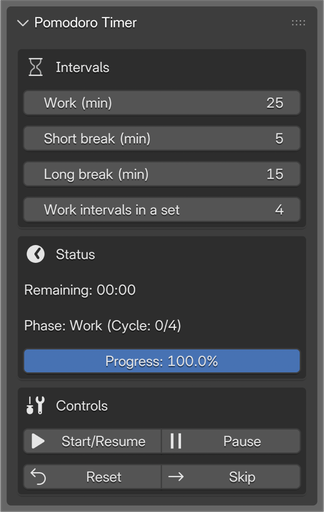
- Customise Intervals: Adjust the Work session, Short break, Long break, and Work intervals in a set in the "Intervals" section. Changes update automatically if the timer is paused.
Starting a Session
- Click Start/Resume to begin. The timer kicks off in "Work" phase, counting down from your set duration.
- A progress bar shows your advancement through the current phase.
During the Session
- Monitor the status: Remaining time displays in MM:SS format, along with the current phase and cycle count.
- If needed, click Pause to temporarily stop the timer without resetting.
- Click Skip to jump to the next interval immediately.
Completing Phases
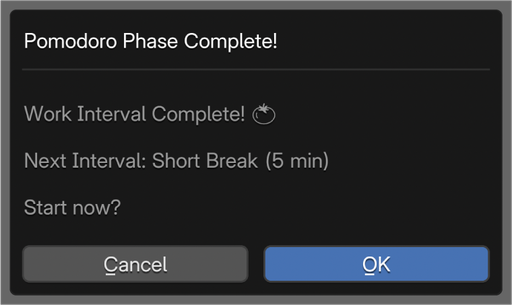
- When a phase ends, a notification dialog pops up, confirming completion and previewing the next phase.
- Confirm to auto-start the next interval, or adjust as needed.
- After a set of work intervals (e.g., 4), it switches to a long break and resets the cycle count.
Resetting
- Click Reset to return to the initial work phase with default remaining time.
This add-on keeps everything within Blender, no need to switch apps. Stay in the zone, complete more pomodoros, and watch your productivity soar!
Changelog
- Version 1.0.0 (20250725) - Initial Release