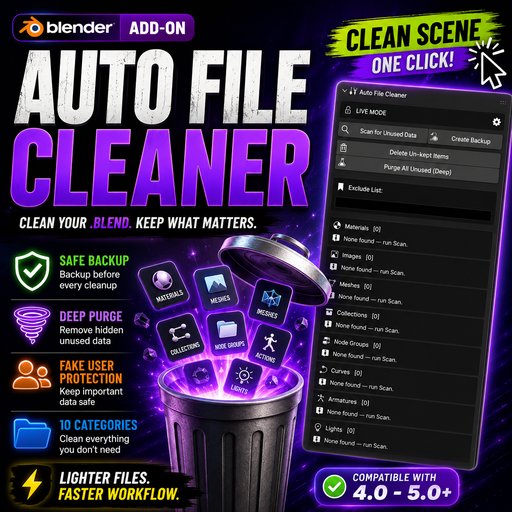
Auto File Cleaner - Remove Unused Materials, Images & Meshes | Blender 4.0–5.0+
Auto File Cleaner scans your .blend file for unused materials, images, meshes, and more — lets you review everything before deleting — and removes only what you choose, with automatic backups so nothing is ever lost by accident.
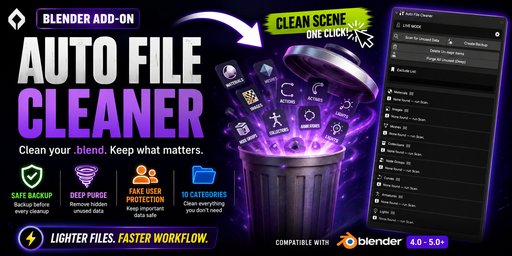
🧹 Clean Your .blend. Keep What Matters.
Auto File Cleaner scans your entire .blend file for unused datablocks — materials, images, meshes, node groups, curves, armatures, lights, cameras, and texts — lets you review everything before deleting, and removes only what you choose. With automatic backups, Safe Mode, and a one-click Deep Purge, you are always in full control.
WHAT IT CLEANS
✅ Materials ✅ Images ✅ Meshes ✅ Node Groups ✅ Curves ✅ Armatures ✅ Lights ✅ Cameras ✅ Texts ✅ Collections
🧹 Auto File Cleaner — v2.0.0
Scan. Preview. Clean. — A Professional .blend Housekeeping Add-on for Blender 4.0 to 5.0+
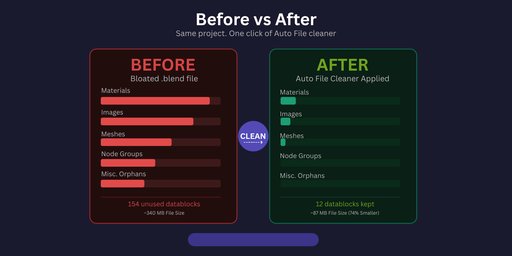
Every Blender project accumulates orphaned datablocks over time — unused materials from deleted objects, leftover images from abandoned ideas, meshes that nothing references anymore. Auto File Cleaner gives you a professional, safe, and non-destructive workflow to find and remove all of them in one place.
⚡ Key Features
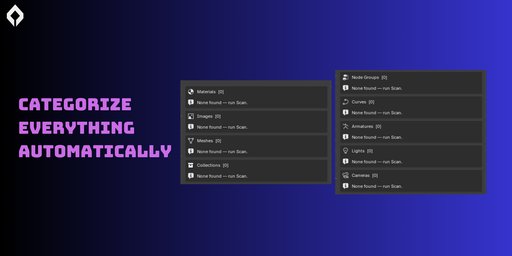
🔍 Smart Scan — Across All 10 Datablock Categories
What it does. One click on Scan for Unused Data searches every supported datablock type in your .blend and populates a scrollable preview list for each category — before anything is deleted.
Why it matters. You always see exactly what will be removed. No surprises, no silent deletions. Each category shows an item count badge so you immediately know how cluttered each section is.
Categories scanned: Materials, Images, Meshes, Collections, Node Groups, Curves, Armatures, Lights, Cameras, and Texts.
📋 UI List Preview — Pin Items to Keep Before Deleting
What it is. Each category has its own scrollable, searchable UIList panel — the same professional list component Blender uses in its own editors. Every unused datablock appears here with its user count and fake-user status.
Why it matters. You can mark individual items as Keep (the pin icon) before running any deletion. Only un-pinned items get removed. It's a full visual preview system, not a blind batch delete.
Select / deselect all. Each category header has quick Select All and Deselect All buttons so you can manage large lists in seconds.
🔒 Safe Mode — Zero Accidental Deletions
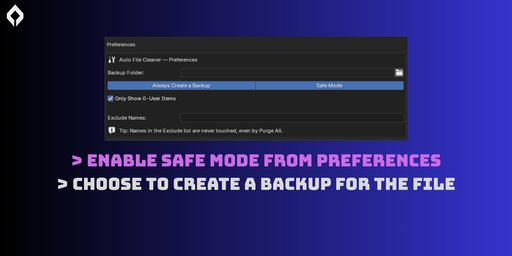
What it is. Safe Mode is enabled by default. When it is on, the Delete and Purge buttons are locked and cannot be triggered — even accidentally.
Why it matters. New users and professionals alike benefit from having a hard lock between scanning and deleting. You must consciously switch to Live Mode in the add-on preferences before any data can be removed. Scanning and creating backups always work regardless of Safe Mode.
💾 Automatic Timestamped Backups
What it is. Before any deletion, Auto File Cleaner saves a timestamped copy of your entire .blend file to a folder of your choice.
Why it matters. Even if you remove something you later need, you always have an exact restore point. Backup filenames follow the pattern autoclean_backup_YYYYMMDD_HHMMSS.blend so they sort cleanly in any file explorer.
Manual backup button. You can also trigger a backup independently at any time without running any deletion — useful before major edits.
👁 Per-Item Fake User Toggle
What it is. Every item in the UIList has a fake-user icon button. Click it to toggle use_fake_user on that specific datablock directly from the panel — no need to go to the Properties editor.
Why it matters. Fake users keep datablocks alive in Blender even with zero real users. Now you can review and manage fake-user flags right inside the cleaner without changing workspaces.
📌 Exclude List — Permanently Protect Named Datablocks
What it is. A comma-separated list of datablock names that Auto File Cleaner will never touch — not in normal deletion and not in Deep Purge.
Why it matters. Some datablocks look unused but need to stay — default materials, shared node groups, studio templates. Add their names once to the Exclude List and they are permanently safe from all clean operations.
Add Keep-marked → Exclude. Any item you pin as Keep in the UIList can be promoted to the permanent Exclude List with one button click so it is protected in every future session.
⚡ Deep Purge — Exclude-Safe Recursive Cleaning
What it is. A multi-pass recursive purge that removes all zero-user datablocks from all 10 categories in a single operation — while fully respecting your Exclude List.
Why it matters. Blender's built-in Purge All operator ignores any custom exclude rules — it deletes everything. Auto File Cleaner's Deep Purge runs its own controlled loop that checks every datablock name against your Exclude List before removing it. Your protected items are always safe.
Multi-pass logic. Runs up to 5 passes because removing one datablock can cause another to drop to zero users. The loop stops early when a pass finds nothing new to remove — giving you a genuinely thorough clean without over-deleting.
🔄 Workflow — How to Use It
-
Open the N-panel in the 3D Viewport and click the File Cleaner tab.
-
Click Scan — all 10 categories populate with unused datablocks instantly.
-
Review the lists — pin any items you want to keep using the pin icon.
-
Click Backup — save a timestamped copy of your .blend (optional if Always Backup is on).
-
Disable Safe Mode in preferences, then click Delete Unkept Items or Deep Purge.
-
Done. The scan refreshes automatically, showing your now-clean file.
📍 Where to Find It
After installation, open the N-panel in the 3D Viewport (N key) and click the File Cleaner tab. All features — Scan, Backup, UIList, Delete, Deep Purge, and Exclude List — are in one compact panel.
🧩 Version & Compatibility
Auto File Cleaner v2.0.0
Supports Blender 4.0+ and 5.0+. Install by dropping the AutoCleanerv2ext folder into your Blender addons directory and enabling it in Preferences → Add-ons.
📜 License
This software is licensed under the GNU General Public License v3 (GPL).
Free to use, modify, and redistribute under GPL terms. No warranty expressed or implied.
📌 Attribution is appreciated but never required.
💡 Created with ❤️ by Hamayl — NovaStrikes