O'Explosion
Procedural directional array explosion add-on for Blender 4.2+.
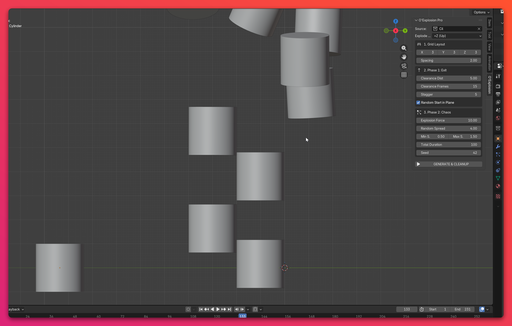
Designed for motion graphics and abstract animations, this tool allows you to create complex, multi-phase explosion effects using object instancing and precise timeline control.
Features- Directional Control: Choose the primary axis of explosion (+X, -X, +Y, -Y, +Z, -Z).
- Two-Phase Animation: * Phase 1 (Exit): Strict linear clearance to prevent intersecting geometry.
- Phase 2 (Chaos): Procedural scattering with randomized rotation and scaling.
- Instance & Modifier Support: Automatically duplicates source objects along with their entire modifier stack (Bevel, Subdivision, etc.) while sharing mesh data to save memory.
- Organic Layer Start: Option to randomize the starting order of objects within the same coordinate plane for a more natural, wave-like effect.
- Smart Timeline Management: Automatically clears old animation data upon regeneration and adjusts the scene's end frame to match the final keyframe of the explosion.
- Built-in Debugger: Includes standard O'-series alert and file log debuggers for stable operation.
Since this add-on uses the modern Blender 4.2+ Extension format:
- Download the O_Explosion_Pro.zip file.
- Open Blender and navigate to Edit > Preferences > Add-ons.
- Click the drop-down menu in the top right corner and select Install from Disk....
- Locate your downloaded .zip file and select it.
- Enable the extension in the list.
- Create your base geometry (donors) and place them into a specific Collection (e.g., "Source_Debris").
- Open the 3D Viewport and press N to open the side panel.
- Navigate to the O'Explosion tab.
- In the Source Collection field, select your prepared collection.
- Configure the Grid Layout to set the initial array dimensions and spacing.
- Adjust Phase 1: Exit settings to determine how far and how long the objects travel linearly before exploding.
- Adjust Phase 2: Chaos settings to set the explosion force, spread, and random scale boundaries.
- Click GENERATE & CLEANUP.
The script will automatically generate the instances, apply the keyframes, and update your timeline. If you want to change the parameters, simply adjust the sliders and click generate again — the old explosion will be cleanly removed.
Requirements- Blender 4.2.0 or newer.
SPDX-License-Identifier: GPL-3.0-or-later

$4
$4
Name
O'Explosion
Archive version
1.4.0
Platforms
windows-x64, macos-arm64, linux-x64, macos-x64, windows-arm64
File size
2.5 MiB