Legacy DAE Export for Blender 5
Restore Classic Collada Workflow (No Auto Baking)
Bring back Blender’s original DAE export workflow in Blender 5 — simple, fast with legacy dae
This add-on restores the original legacy DAE export behavior so you can export your models exactly the w
Bring back the original Collada (.dae) export workflow in Blender 5 — simple, clean, and fully under your control.
## Why This Add-on?
The advanced version of DaeXport introduced auto baking to simplify exports. ( https://www.blenderkit.com/addons/e5652919-6e8c-4d24-aeb5-cf64403e2455/)
But many artists preferred the old workflow — where they had full control over materials, textures, and structure.
This add-on is built for that.
No forced changes. No automation you didn’t ask for.
Just the classic export behavior — exactly how it used to work.
## What You Get
- Restore legacy DAE export in Blender 5
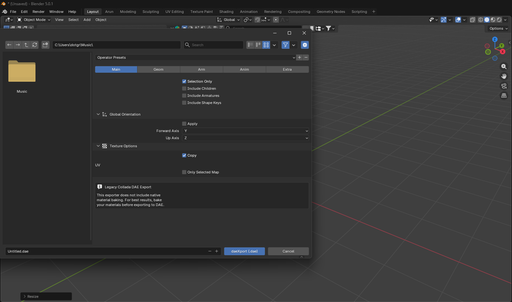
- No automatic texture baking
- Full control over materials and export output
- Clean and predictable results
- Lightweight and easy to use
## How It Works
After installation:
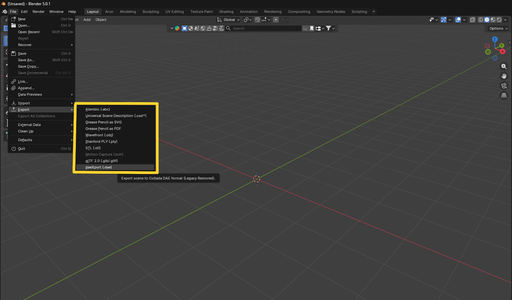
File → Export → Legacy DAE (.dae)
That’s it. No extra setup needed.
## Who This Is For
- Artists who prefer manual control
- Game developers using custom pipelines
- AR / VR workflows
- Anyone who relied on the old DAE exporter
## Important Note
This version does NOT include auto baking.
If you need automated texture baking, check the advanced version of DaeXport.
If you want control and simplicity — this is the right tool.
## Support
For help or updates:
support@digibee.in