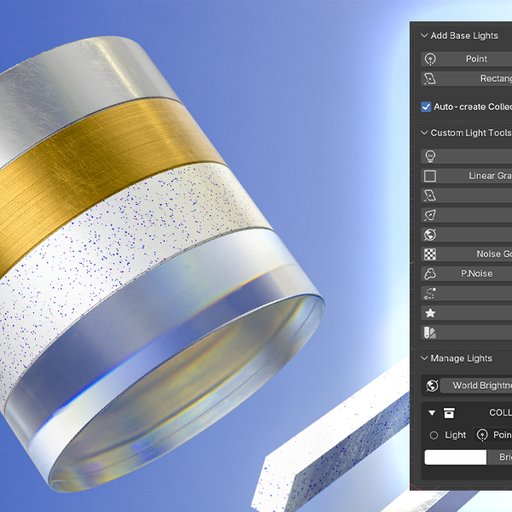
Custom Lights V2
Custom Lights for Blender centralizes light management and simplifies the creation of unique, specialized light types. Quickly build professional scenes and streamline your 3D workflow to focus on creativity
What's New in Custom Lights 2.0
🚀 Blender 5.0 Compatible
Fully updated and tested to ensure seamless performance with the latest Blender 5.0 release.
🌍 World Brightness Control
Quickly adjust your scene's world/environment brightness directly from the Manage Lights panel.
🎚️ Collection Brightness Multiplier
New slider on each collection header to multiply brightness of all lights in that collection. Click the ✓ button to apply and reset.
🎨 Split Gradient Light Plane
The Gradient Light Plane is now split into two dedicated operators:
Linear Gradient - Creates linear gradient emission planes
Sphere Gradient - Creates spherical gradient emission planes
Both include a new "Transparent Black Gradient" checkbox that makes black areas of the gradient transparent.
✨ Plane Gobo Lights
Three new plane gobo operators for quick light texture effects:
P.Noise - Noise-based gobo texture
P.Voronoise - Voronoi noise pattern
P.Wave - Wave pattern gobo
🌡️ Accurate Black Body Colors
Updated Black Body color values to align perfectly with Blender's physical light calculations.
⚡ Quick Access Shortcut "L"
Press "L" while a light is active to instantly open the parameters popup menu.
🌐 Light Dome Updates
Significant improvements to the Light Dome feature for better environmental lighting.
🔦 Gobo Light Enhancements
Gobo Light Noise: Add organic variation and texture to your lights.
Image Gobo Light: Project images and patterns for complex lighting effects.
🎨 UI & Manage Light Updates
Revamped Manage Light interface - cleaner, more organized, and easier to navigate.
Key Features
1. Add Base Lights
Rapidly create standard Blender lights at your cursor's position.
Types: Point, Sun, Spot, Area (Rectangle/Ellipse).
Auto-Organization: Automatically groups lights into collections.
2. Custom Lights & Tools
Advanced lighting tools for complex scenarios.
Tracker Light: Area lights that automatically track a target object.
Linear/Sphere Gradient Plane: Emissive planes with adjustable gradients and transparent black option.
Translucent Light Plane: Diffusion plane to soften shadows and create studio effects.
Simple God Rays: Volumetric "God Ray" effects for Spot lights.
Plane Gobos: Quick noise, voronoise, and wave pattern gobos.
Track to Selected: Apply "Track To" constraint to multiple objects.
Make Emission Mesh: Convert any mesh into a light source.
Input Blackbody Color: Set light color using Kelvin temperature values.
3. Manage Lights
Your command center for all lighting in the scene.
Centralized View: All lights and emissive meshes organized by collection.
Collection Brightness: Multiply brightness of all lights in a collection.
World Brightness: Control environment lighting strength.
Direct Control: Adjust Color, Brightness/Power, and Size/Shape from the list.
Selection: Click names to select lights or entire collections.
Visibility: Toggle Viewport, Render, and Camera visibility.
Installation & Getting Started
Install:
Download the custom_light.zip file.
Open Blender and go to Edit > Preferences > Add-ons.
Click Install..., select the zip file, and enable "Custom Lights".
Location:
In the 3D Viewport, press "N" to open the Sidebar.
Click on the "Custom Lights" tab.
Start Lighting:
Use the panels to add lights, apply effects, or manage your scene's illumination.
Happy Lighting!