Final Topology for CAD professionals
Professional subdivision modelling tools, simply magic
Blender 3D add-on that introduces subdivision snapping, retopo and modeling tools from the 21st century.
This Blender 3D add-on features many tools that were missing and also organizes some simple, but essential tools for polygonal modeling. Enhanced version adds extra tools for professional CAD and automotive industry modellers.
Features
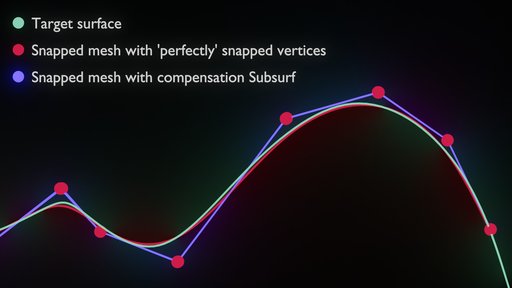
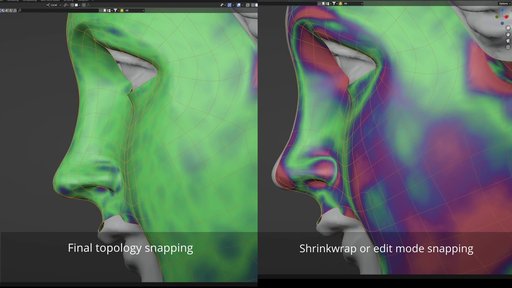
Inverse subdivision snapping:
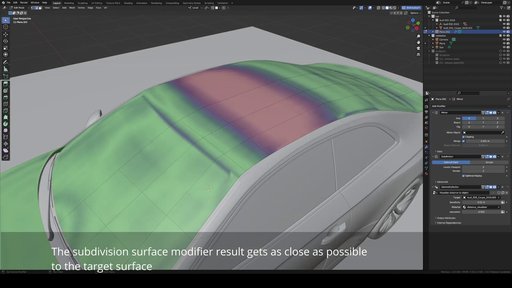
- snaps mesh vertices in edit mode so that if the subdivision modifier is used, the resulting surface is as close as possible to the surface.
- Live, or 'Simulation' mode of this tool, which works realtime during modeling
- Neighbours levels, Number of iteration settings
- Single step operator that can be called with a shortcut with arbitrary number of iterations.
- Supports offset from the target surface.
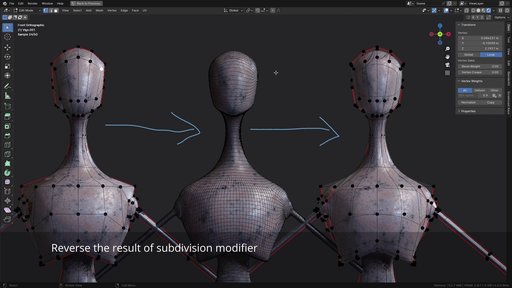
Unsubdivide
- takes a mesh that resulted from a subdivision modifier being applied (In blender or in any other application) and recreates the original low-resolution mesh.
- has settings for number of subdivisions, number of iterations of the algorithm. Higher interation numbers yield precise results.
Shape Freeze
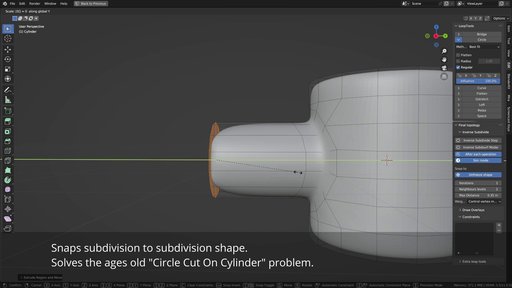
- Enables to change topology of Subdivision surface model while keeping the resulting shape as same as possible.
Advanced version features:
- Constraints - Edit mode constraints that work together . Main difference compared to various shrinkwrap modifier tricks is that all constraints get evaluated in a loop together with the subdivision surface snapping, so all conditions get optimized.
- Inverse subdivision - Enables to use inverse subdivision on limited selection and mixed with constraints. Boundaries of the constrained area are now handled well.
- Plane constraint snaps verts to a plane, has a fixed version where user can specify coordinates. Multiple loops in 1 constraint supported.
- Curve constraint - Experimental constraint that allows to snap to curve during the loop, including inverse subdivision functionality.
- Space constraint - Enables to space verts along assigned loops evenly. Borrowed from and works same as in loop tools.
- Slide optimize - slides edges along a loop so that the edge straightens or gets angles on both sides of vertex equalized.
- Loop align to normal plane - takes a loop and aligns it to a plane that is aligned with it's normals directions.
- Loop slide optimize - balances angles that there are between edges of a loop
- Flatten selection - simple flatten to median plane operator (Similar to looptools)

Basic instructions
Read tooltips directly in the add-on. Every button should have enough info to use the tool.
You need to have a mesh that has Subdivision surface modifier on. Any other modifiers will turn off during interaction.
Watch the Blender Conference talk below to better understand the idea behind the add-on:

$99
$99
Name
Final Topology for CAD professionals
Archive version
2.0.0
Platforms
windows-x64, macos-arm64, linux-x64, macos-x64, windows-arm64
File size
6.2 MiB