Auto Paint Boundaries
Paint cleanly inside smart, selection-limited regions with quick automatic setups
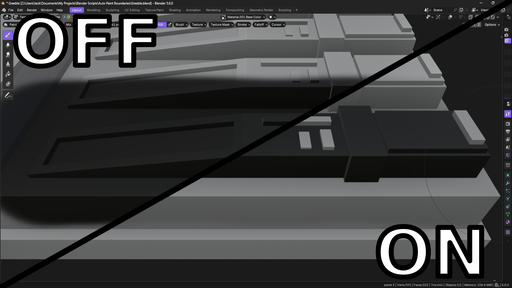
Automatically limit paint strokes to clean, connected face regions.
Click a face and the add-on selects the correct area based on your chosen boundaries, enables Face Masking, and lets your normal brush handle the rest.
Supports:
- Texture Paint
- Vertex Paint
- Weight Paint
What It Does
On click:
- Finds the face under your cursor
- Expands to a connected region using active boundary rules
- Enables Face Masking automatically
- Passes the stroke through to your active brush
No manual face selection. No replacement tools. Just controlled paint.
Toggle boundaries and pin masks directly from the tool header. Configure default settings and custom shortcuts in the addon preferences.
Boundary Rules
Enable the boundaries you need:
Topology
- Single Face
- Mesh Island
- Face Set
Surface
- Normal Angle (adjustable threshold)
Edge Attributes
- Sharp Edges
- UV Seams
- Crease Edges
- Bevel Weight
Rules can be combined (for example: Sharp + UV Seams).
Single Face always limits the result to exactly one polygon.
Pin Mask Area
Keep the mask between strokes instead of clearing it automatically.
- Shift + Click → Add region
- Ctrl + Click → Subtract region
- Ctrl + Shift + Click → Replace mask
Useful for building up complex paint areas without switching modes.
When working with masks you can use ctrl + numpad +/- to grow or shrink the selection, and ctrl + I to invert it.
Saved Masks
Save face selections as named presets directly on the object.
Reload them later with one click.
Preferences
Open the addon preferences (Edit → Preferences → Extensions → Auto Paint Boundaries) to:
- Shortcuts — Easily assign custom keybinds for toggling boundaries, toggling pin mask area, and clearing the selection.
- Startup Defaults — Choose which settings are applied automatically when opening a new file (boundaries enabled, pin mask, active boundary types, normal angle).
Support Development
If this add-on saves you time or improves your workflow, you can support continued development here: