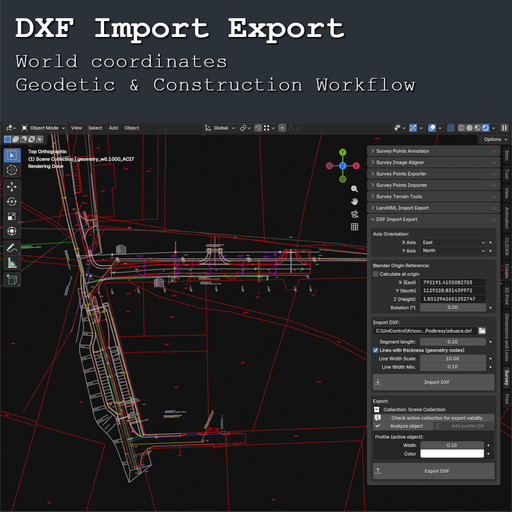
DXF Import Export
Blender DXF Import Export for geodetic and construction workflows. Import drawings in world coordinates, organize by layers, preserve line styling, and export geometry for reference and Machine Control underlays.
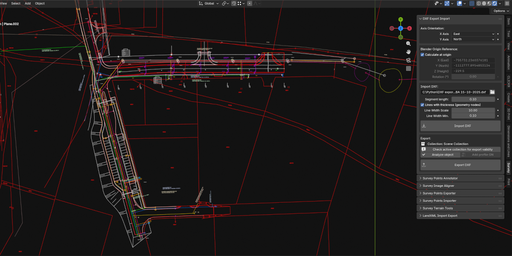
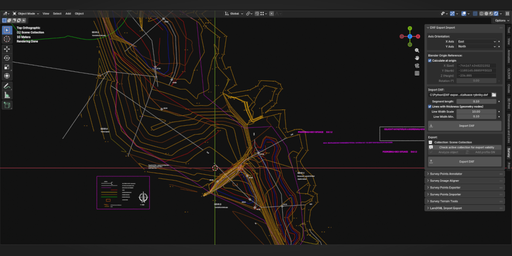
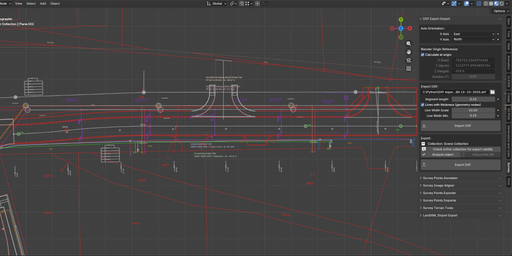
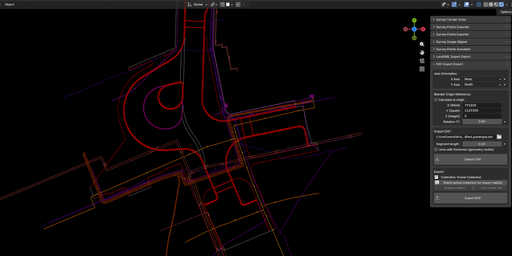
Description
DXF Import Export is a practical Blender add-on for working with DXF drawings in real-world coordinates.
It is designed for geodetic, construction, and technical workflows where DXF files need to be imported as usable reference geometry, organized by layers, and exported back from Blender in a form that is useful in practice.
Instead of trying to support every corner of the DXF specification, this add-on focuses on what matters most in real production work:
reliable placement by reference point, layer-based organization, readable line styling, and practical geometry export for downstream use.
What This Add-on Does
- Imports commonly used DXF entities from model space
- Splits imported content by DXF layer into Blender collections
- Supports reference-point transformation for world-coordinate workflows
- Transfers line color and thickness from DXF layer settings
- Exports practical DXF geometry from Blender meshes and text objects
- Helps use DXF drawings as underlays, references, or a base for further modeling
Key Features
Import
- Reads commonly used DXF entities from model space:
LINE, ARC, CIRCLE, POLYLINE, LWPOLYLINE, SPLINE, ELLIPSE, POINT, 3DFACE, SOLID, TRACE, MESH, DIMENSION, TEXT, MTEXT - Splits imported entities into Blender collections by DXF layer
- Supports line color and thickness from layer settings
- Optional Geometry Nodes setup for visible line thickness
World Coordinates
- Reference-point import and export
- Placement in real-world coordinates
- Axis orientation support
- Rotation support for matching external coordinate systems
Export
- Exports LWPOLYLINE from mesh edge chains
- Exports 3DFACE from triangulated mesh faces
- Exports TEXT and MTEXT from Blender Font objects
- Useful for DXF underlays and downstream technical workflows
Typical Use Cases
- Importing DXF drawings as reference data in Blender
- Using technical underlays in world coordinates
- Preparing base geometry for geodetic and construction models
- Creating DXF underlays for Machine Control workflows
- Exporting simplified practical DXF data from Blender
Requirements
- Blender 5.0+
- Intended for practical DXF workflows, not full lossless DXF roundtripping
Why Use DXF Import Export?
Because in technical workflows, DXF data must be usable, organized, and correctly placed in coordinates that match reality.
This add-on is built for practical DXF work in Blender where reference-point placement, layer-based structure, and real-world workflow matter more than theoretical support for every DXF feature.
Documentation
DXF Import Export is a Blender add-on for practical DXF work in geodetic and construction workflows.
It is designed for cases where DXF drawings need to be imported into Blender as usable reference geometry, organized by layers, positioned in world coordinates, and exported back in a form that is useful in real production workflows. Rather than trying to support every aspect of the DXF specification, the add-on focuses on the parts that matter most in practice.
Panel Location
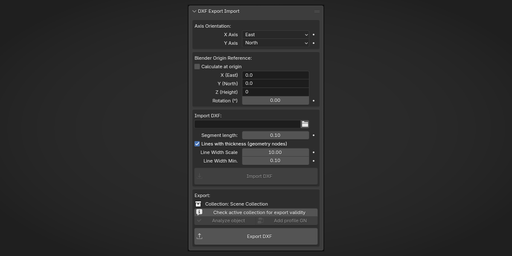
3D Viewport → N Panel → Survey → DXF Import Export
Main Features
Import DXF
- Imports commonly used DXF entities from model space
- Splits imported geometry by DXF layer into Blender collections
- Supports reference-point import for world-coordinate workflows
- Can assign line color and thickness from DXF layer settings
- Optional Geometry Nodes setup for visible line thickness
Export DXF
- Exports LWPOLYLINE from valid mesh edge chains
- Exports 3DFACE from triangulated mesh faces
- Exports TEXT / MTEXT from Blender Font objects
- Writes output using the current reference point, axis orientation, and rotation settings
World Coordinates
A core feature of the add-on is reference-point transformation.
This allows DXF files to be imported and exported relative to a chosen world-coordinate reference, which is essential in workflows where drawings must align with survey coordinates or construction data instead of Blender’s local origin. Axis orientation, origin reference, and Z rotation can all be controlled directly in the add-on.
Typical Use Cases
- Importing DXF drawings as reference geometry in Blender
- Using DXF underlays in real-world coordinates
- Preparing base geometry for geodetic and construction models
- Creating practical DXF outputs for Machine Control workflows
- Exporting simplified technical drawings and reference data from Blender
Supported Import Types
The add-on supports practical import of these DXF entity types:
LINE, ARC, CIRCLE, POLYLINE, LWPOLYLINE, SPLINE, ELLIPSE, POINT, 3DFACE, SOLID, TRACE, MESH, DIMENSION, TEXT, MTEXT
Supported Export Types
The add-on exports:
- LWPOLYLINE from valid mesh edge chains
- 3DFACE from triangulated mesh geometry
- TEXT / MTEXT from Blender Font objects
Polyline Export Notes
Export as LWPOLYLINE works only for meshes that represent clean edge chains without branching.
Each vertex must have degree 1 or 2 only. Meshes with branching are not exported as polylines. The add-on includes tools to analyze selected meshes and identify invalid vertices.
Practical Workflow Tools
The add-on also includes utilities for:
- checking whether the active collection is valid for export
- analyzing whether the active mesh is suitable for polyline export
- adding a Geometry Nodes line profile to valid polyline meshes
- editing line width and color on supported profiled objects
Important Notes
This add-on is not intended for full-featured, lossless DXF roundtripping.
It is built as a practical DXF workflow tool for Blender, especially where world-coordinate placement, layer-based organization, and usable reference geometry matter more than theoretical support for every DXF feature. Other DXF entities such as HATCH or BLOCK / INSERT are not directly supported.
For files with large world coordinates, manual reference-point entry is often the most reliable approach. The automatic Calculate at origin option may not always work reliably on all DXF sources.
Requirements
- Blender 5.0+
- Installed as a Blender extension from ZIP
License
This add-on is licensed under GPL-3.0-or-later.
It includes the ezdxf library, which is licensed under the MIT License.