Advanced Modifier Tools (AMT)
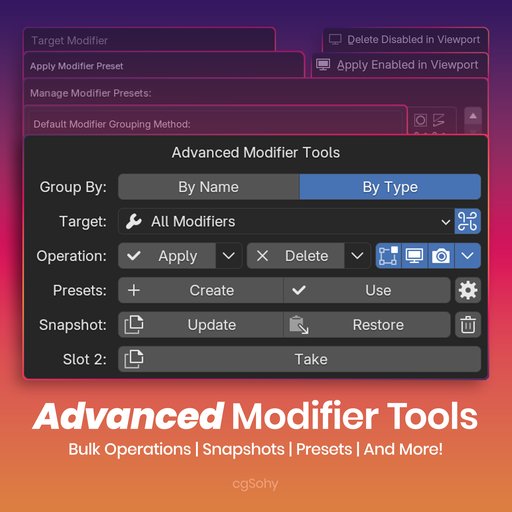
Advanced Modifier Tools (AMT) simplifies modifier workflows in Blender. Bulk apply, delete and toggle modifiers across selections. Save and share presets including textures and dependencies. Take snapshots, isolate modifiers and batch-select objects.
Advanced Modifier Tools, Your Modifier Workflow Companion
Tired of clicking through modifier stacks on many objects? Advanced Modifier Tools (AMT) is an all-in-one Blender addon that aims to simplify repetitive modifier tasks by collecting useful bulk operators and utilities into a single, compact panel in the modifier properties. Inspired by Blender’s own modifier tools, AMT focuses on straightforward, one-click operations so you can spend more time on the creative work.
Core Features
-
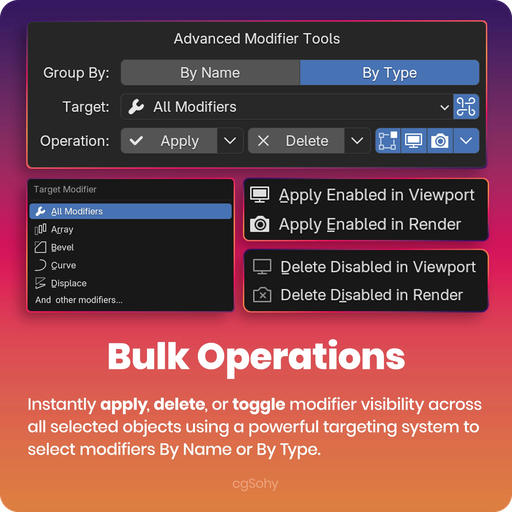
Bulk operations: Apply, delete, or toggle visibility for modifiers across all selected objects in one go, no more one-by-one edits.
-
Flexible targeting: Operate on modifiers by Name (for example, only Bevel.001) or by Type (for example, every Subdivision Surface modifier).
-
Solo mode: Temporarily isolate a single modifier to see its effect without the rest of the stack, helpful when debugging or fine-tuning.
-
Selection helpers: Select all objects that use a particular modifier (by name or type) so you can operate on the correct set quickly.
-
Preset system: Save a modifier stack as a reusable preset. Presets can include textures and object/collection dependencies so a preset can recreate a full setup, not just modifier settings.
-
Import / Export: Share presets or move them between projects using the .amtp archive format. Drag-and-drop import makes bringing a saved setup into a file quick.

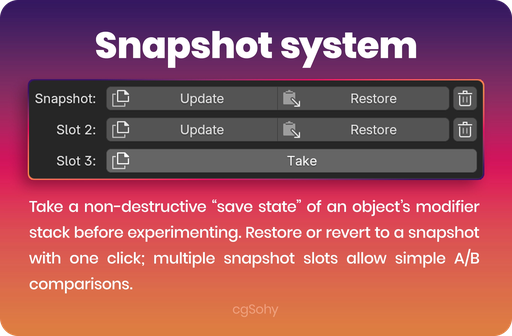
- Snapshot system: Take a non-destructive “save state” of an object’s modifier stack before experimenting. Restore or revert to a snapshot with one click; multiple snapshot slots allow simple A/B comparisons.
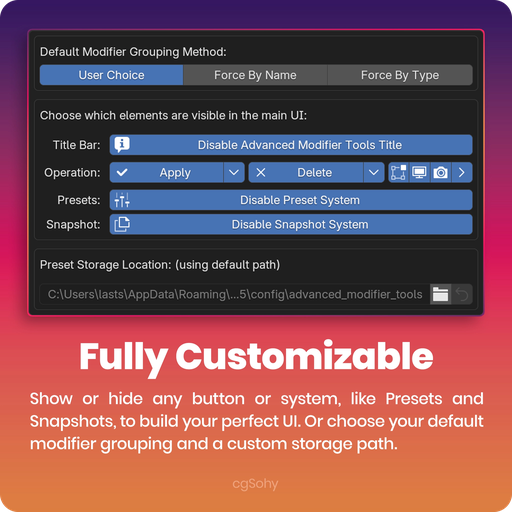
- Compact, customizable UI: The panel is designed to stay out of the way. From the addon preferences you can hide buttons and sections you don’t use, and the UI adapts to narrow panel widths.
A Closer Look at the Workflow
Total control over modifiers
From the operator panel you choose your target modifiers (for example, all Bevels) and then:
-
Apply: Apply the targeted modifiers — with options to apply only visible ones, or to apply everything except the target.
-
Delete: Remove modifiers with precision (for example, delete only disabled modifiers to tidy a stack).
-
Toggle: Switch viewport visibility, render visibility, edit-mode display, and panel expansion for all targeted modifiers in one action.
Presets that include dependencies
AMT’s preset system scans for linked data when it creates a preset:
- If a Displace modifier uses an image texture, the image is copied and packed with the preset.
- If a Curve Deform modifier references a curve object, that object is saved into a dependency .blend file and included with the preset.
When you apply a preset, AMT loads the required textures and objects and reconstructs the setup on the target object so the preset works across projects.
Experiment safely with Snapshots
Before applying a destructive modifier or making large changes, click Take Snapshot. The addon saves the entire modifier stack (including names, settings, and order). If needed, click Restore to revert.
Fully Customizable Interface & Behavior (Preferences)
AMT includes a detailed preferences panel so the addon can match your workflow:
-
Custom preset directory: Presets default to Blender’s user config folder, but you can point the addon to any folder — useful for networked preset libraries or cloud-synced collections.
-
Turn features off: Toggle the visibility of major UI elements (Apply/Delete buttons, visibility icons, the Preset and Snapshot systems, etc.) to create a streamlined panel.
-
Lock grouping method: If you always target modifiers by name or by type, you can lock that choice in preferences and hide it from the main panel.
-
One-click reset: A “Reset UI Settings to Default” button restores the addon’s interface to its original state.
Who benefits from AMT?
-
Hard-surface modelers: Easier handling of Bevel, Boolean, Weighted Normal stacks.
-
Environment artists: Apply and manage modifiers like Geometry Nodes or Displace across many assets.
-
Any Blender user who wants a more efficient, organized modifier workflow.
Requirements
- Blender 4.2 or newer