Scale Print Camera – Pdf & Exact Scale
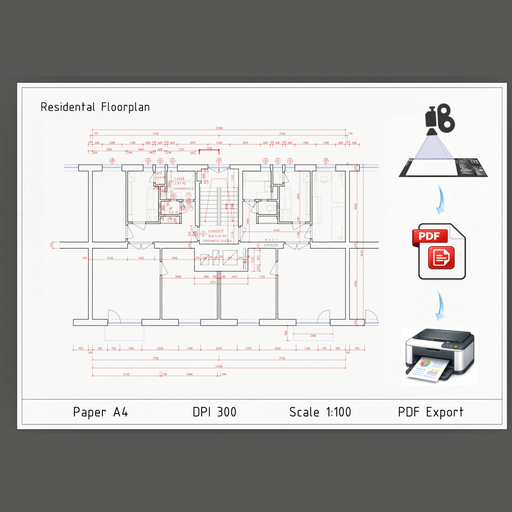
Scale Print Camera is a Blender add-on for creating true-scale technical drawings. It turns a camera into an exact orthographic view matched to real paper size, DPI, and scale, with direct PDF export that prints at 100 % without scaling issues.
ABOUT
Scale Print Camera is a professional Blender add-on that turns a camera into a true technical drawing view.
It allows you to create orthographic views at an exact scale, matched to real paper sizes and DPI — with direct, true-size PDF export.
No guessing, no manual calculations, no print scaling issues.
🔍 What This Add-on Solves
Blender is great for 3D, but it does not natively support print-scale drawings.
Scale Print Camera fills this gap by making the camera behave like a real-world drawing sheet:
* Exact scale (e.g. 1:50, 1:100)
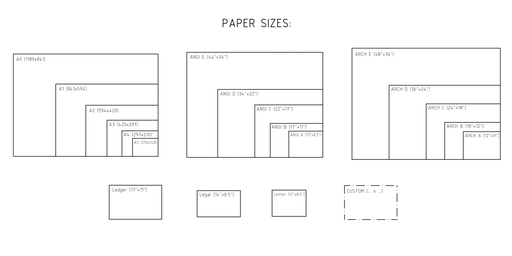
* Exact paper size (A-series, ANSI, ARCH, or custom)
* Correct render resolution derived from DPI
* PDF output that prints at 100% scale
What you see is what you print.
🎯 Key Features
Exact-Scale Orthographic Camera
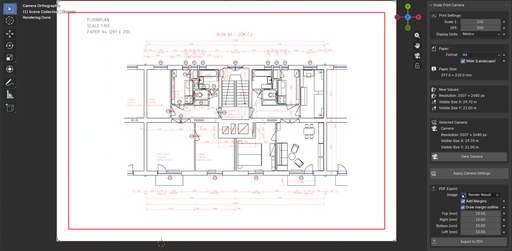
* Automatically sets up an orthographic camera
* Camera view matches the selected paper size at the chosen scale
* Supports portrait and landscape orientation
Paper Size Support
* ISO A-series (A4, A3, A2, A1, A0)
* ANSI / ARCH formats
* Custom paper size in millimeters or inches
DPI-Based Resolution
* Render resolution is calculated automatically from paper size and DPI
* No manual math or trial-and-error
* Ensures consistent print quality
True-Size PDF Export
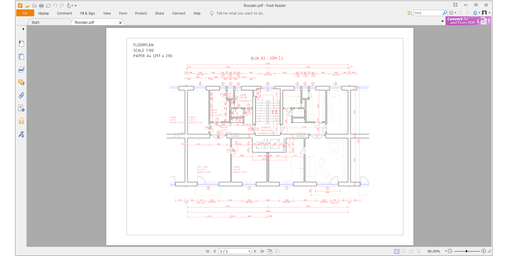
* Export drawings directly to PDF
* Correct page size and scale preserved
* Ready for printing without “Fit to Page” or scaling adjustments
Margins (Printer-Safe Areas)
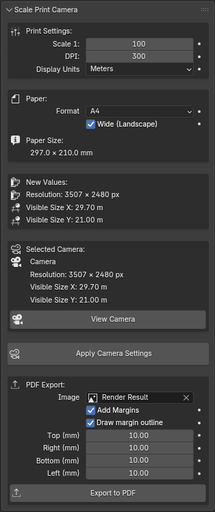
Scale Print Camera supports configurable print margins for PDF export.
Margins add white borders around the drawing without scaling the image, ensuring:
* correct scale is preserved,
* compatibility with printers that cannot print edge-to-edge,
* safe spacing so important content is not clipped.
Margins can be set individually for top, right, bottom, and left edges.
An optional thin outline can be drawn on the inner margin edge for visual reference.
Margins are applied by cropping/overlaying, not by resizing — so what remains visible is still printed at true 100% scale.
🧩 Typical Use Cases
* Technical and construction drawings
* Survey and geodetic documentation
* Architectural plans and details
* Print-ready views for reports or submissions
* Any workflow requiring precise scale on paper
The add-on is fully usable on its own and fits naturally into technical workflows, including survey and construction pipelines.
🔗 Workflow Integration
Scale Print Camera is designed to work seamlessly alongside other technical Blender tools, including survey and annotation workflows.
It is especially effective when combined with point visualization and annotation add-ons, forming a complete pipeline from data to printed drawing.
✅ Why Use Scale Print Camera?
Because a drawing that prints at the wrong scale is not a drawing.
Scale Print Camera ensures that scale, paper size, resolution, and PDF output all match exactly — so your Blender output behaves like a real technical drawing.
DOCUMENTATION
Overview
Scale Print Camera is a professional Blender add-on for creating scale-accurate, print-ready drawings.
It configures an orthographic camera and render resolution to exactly match paper size, drawing scale, and DPI, and allows exporting the result to true-size PDF.
The add-on is designed for workflows where printed scale matters, not just visual output.
Core Functionality
Scale Print Camera automates the setup required for accurate printing:
* Configures the selected camera to orthographic projection
* Calculates camera visible area from paper size and drawing scale
* Automatically computes render resolution from DPI
* Ensures rendered output matches paper dimensions exactly
* Exports rendered images to PDF with true physical size
This eliminates manual calculations, trial-and-error prints, and scale inconsistencies.
Camera Setup
* Works with any existing camera object
* Automatically switches camera to orthographic mode
* Calculates and sets correct ortho_scale
* Sets the camera as the active render camera
* Displays current camera information (resolution, visible size)
A quick View Camera toggle allows instant verification of the result.
Scale & Resolution
* Supports any drawing scale (e.g. 1:50, 1:100, 1:200)
* DPI-based resolution calculation
* Preview of calculated resolution and visible area before applying
* Display units available in meters or feet & inches
All calculations are performed consistently to ensure print accuracy.
Paper Configuration
Supported paper formats:
* ISO A-series (A5 – A0)
* US Letter / Legal / Ledger
* ANSI and ARCH formats
* Fully custom paper sizes
Orientation:
* Portrait and landscape support for standard formats
Custom sizes:
* Enter dimensions in millimeters or inches
* Automatic unit conversion while preserving physical size
PDF Export
Scale Print Camera includes built-in PDF export for reliable printing:
* Exports rendered images directly to PDF
* PDF page size matches selected paper dimensions exactly
* Designed for printing at 100% (Actual Size)
* No external libraries or dependencies
* Lossless compression and white background compositing
PDF export is the recommended way to preserve scale accuracy across different printers and systems.
Margins can be added during PDF export to create printer-safe areas.
Margins are applied by cropping with white space, not by scaling, so the drawing scale remains accurate.
Each margin (top, right, bottom, left) can be configured individually.
An optional inner outline can be drawn to visually indicate the margin boundary.
Typical Use Cases
* Technical and construction drawings
* Survey and geodetic documentation
* Architectural plans and sections
* Print-ready visuals for reports
* Any workflow requiring precise scale on paper
The add-on is fully usable on its own and fits naturally into technical and survey-oriented pipelines.
Notes on Performence and Printing
PDF export may take a few seconds to complete, especially for large paper sizes or high DPI values.
Existing PDF files with the same name are automatically overwritten during export.
For accurate scale:
* Always print at 100% / Actual Size
* Do not use “Fit to Page” or automatic scaling
* PDF export is strongly recommended for consistent results
Incorrect printer scaling will affect output accuracy regardless of camera setup.